Features

What does Quotera actually do?

Write it up, get it signed, do the work, get paid. Quotera is the office side of a service business, in your web browser: estimates customers sign from their phone, work orders, scheduling, invoices and card payments. It is built for auto repair shops, landscapers and one-person businesses in any trade.

Pick your trade below. Each capability starts with the question owners ask us, then a plain answer, a screen from the product and the plan it comes with. Checked against the product on October 20, 2026.

No credit card required.

quotera.app/work-orders
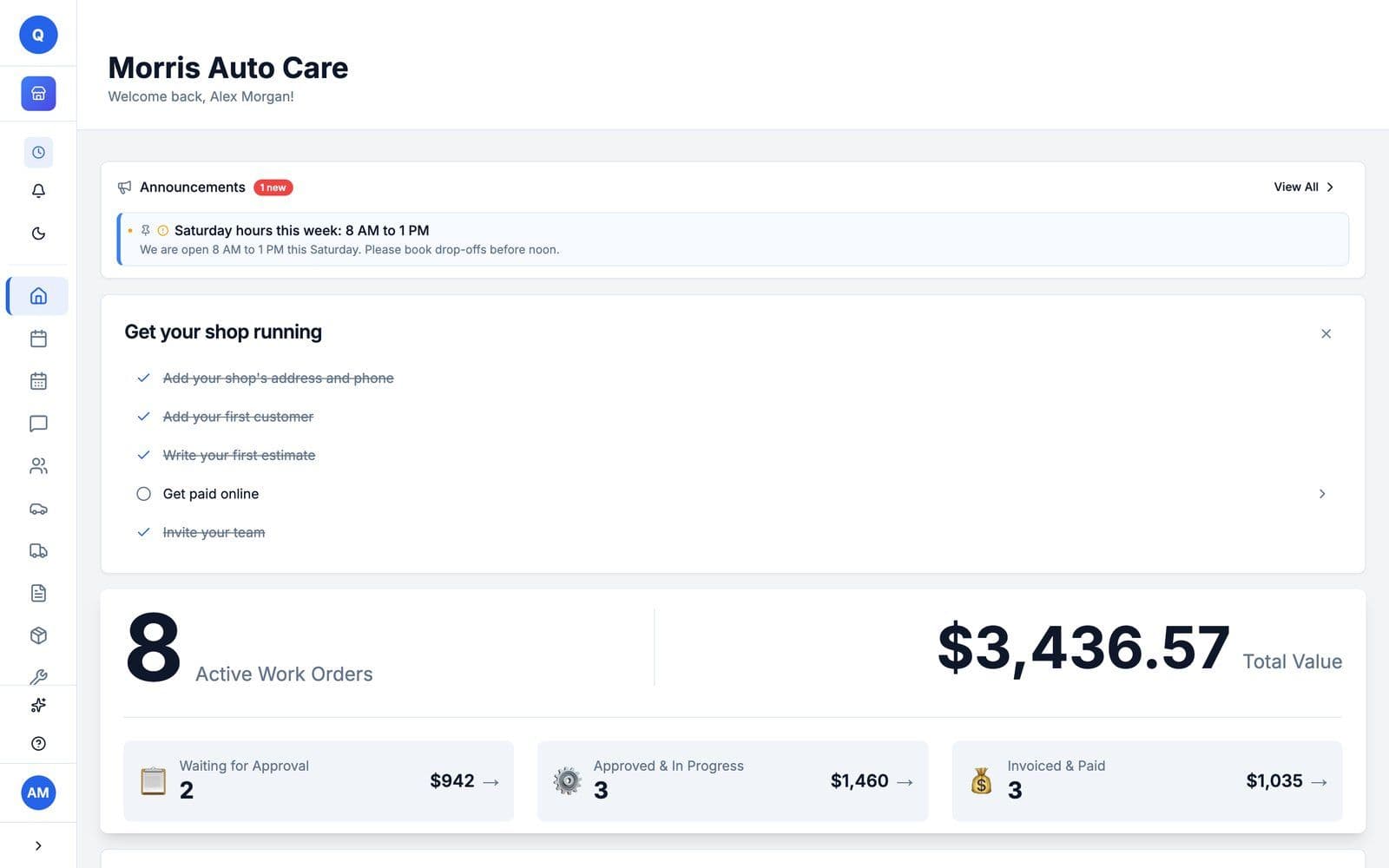
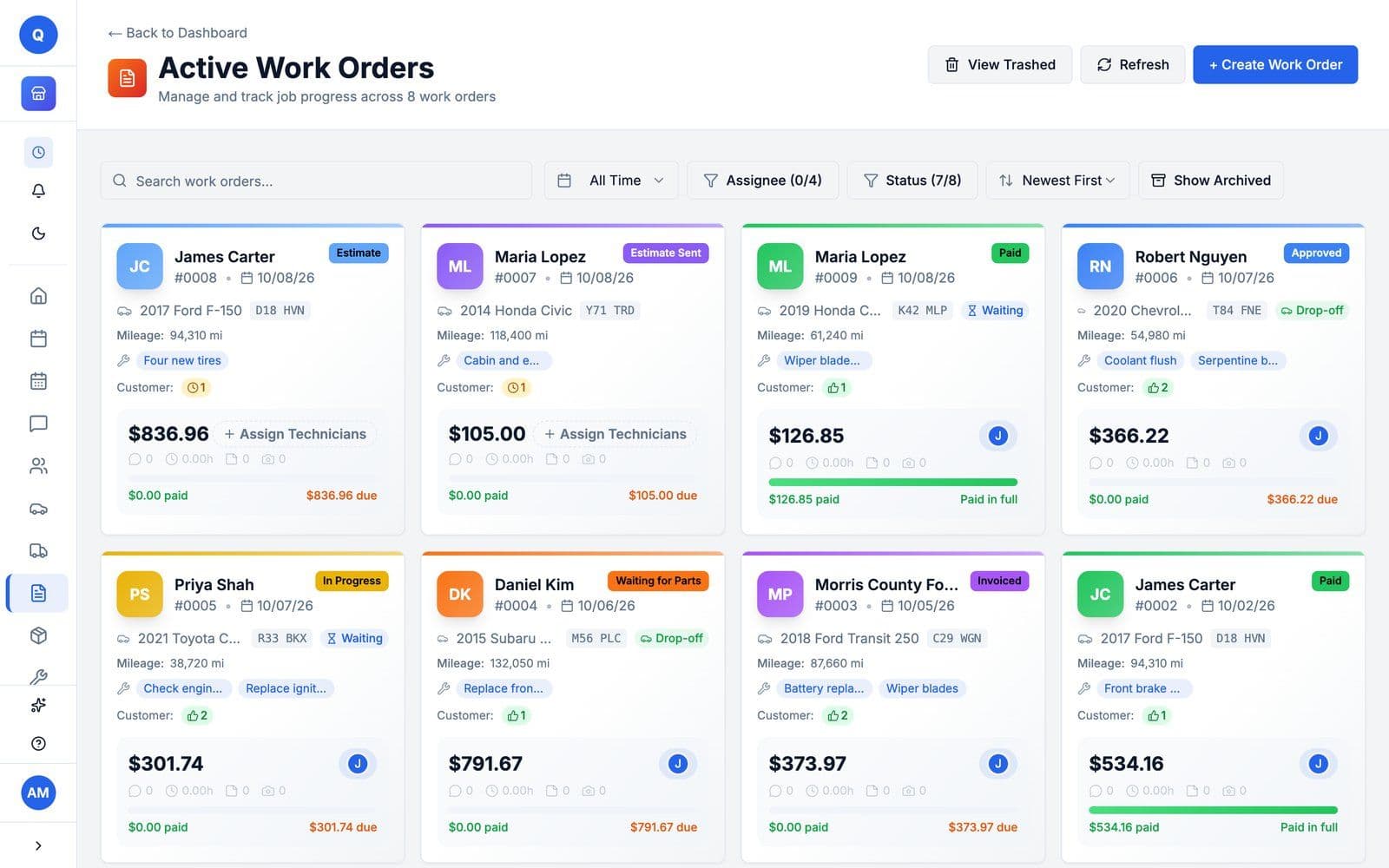
The Active Work Orders board on the auto repair demo shop: eight jobs, each card with the customer, the car and plate, its status, the total and what is still due
quotera.app/work-orders
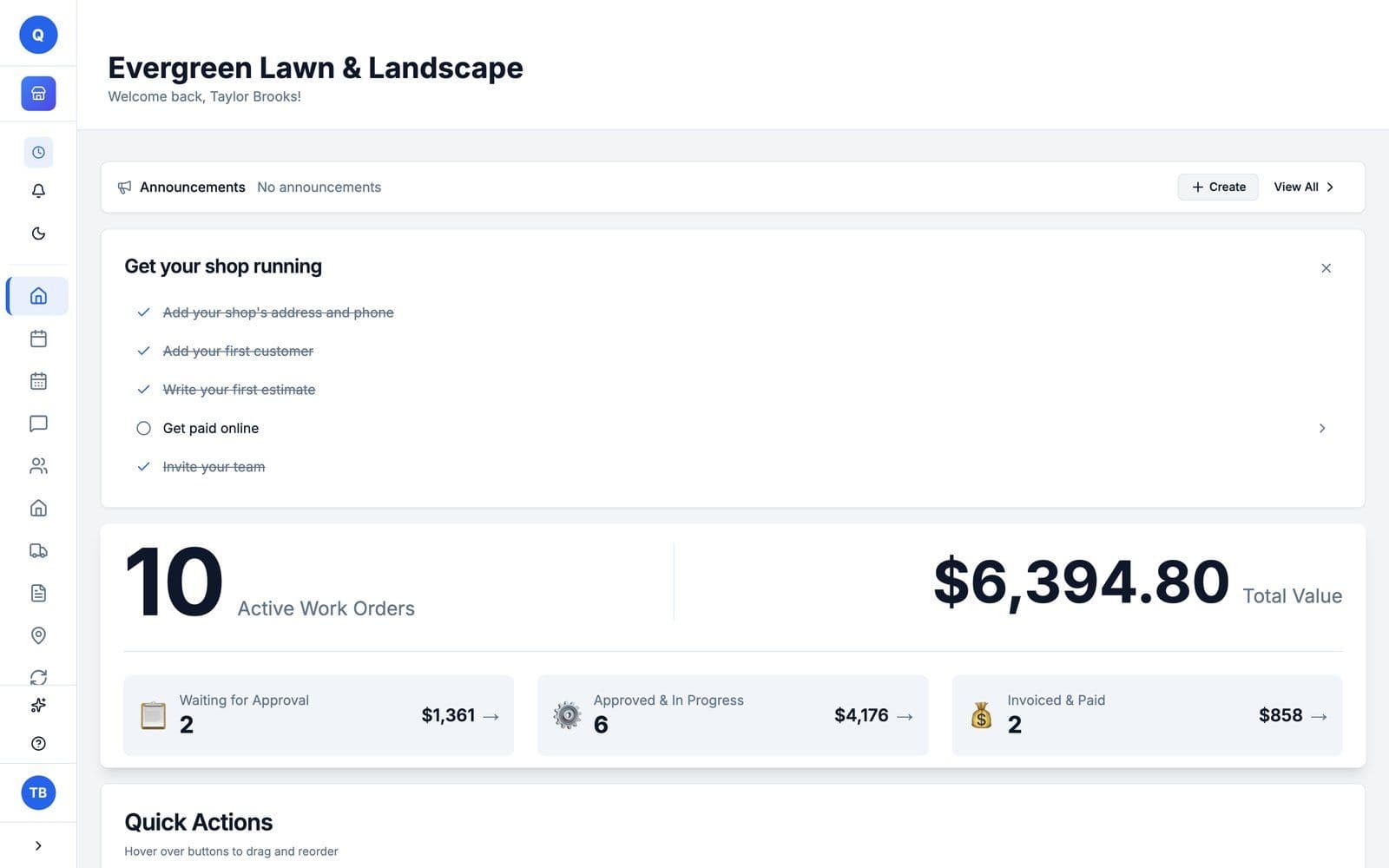
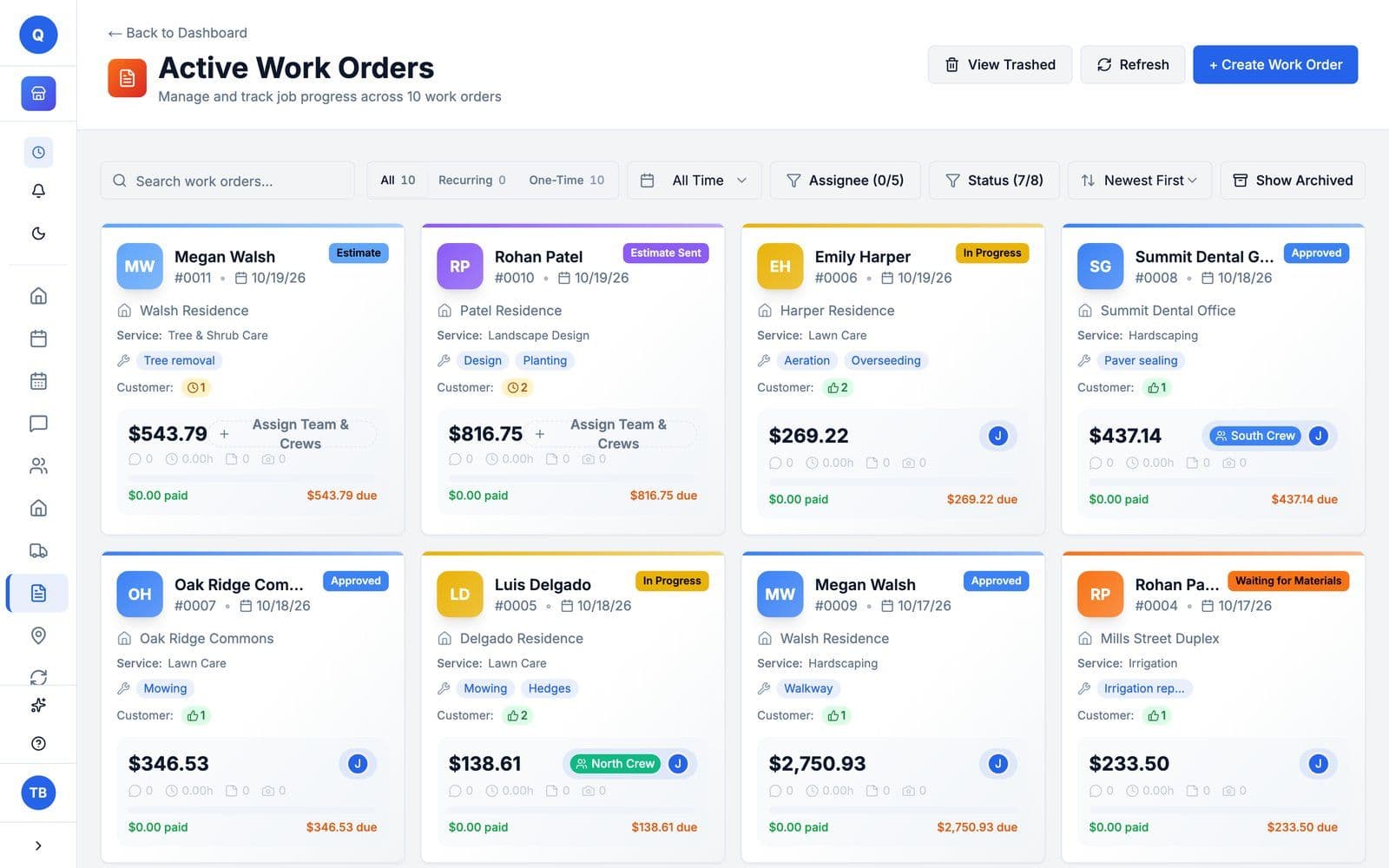
The Active Work Orders board for a landscaping business: each card with the customer, the property, the service, the crew, the total and what is still due
quotera.app/document
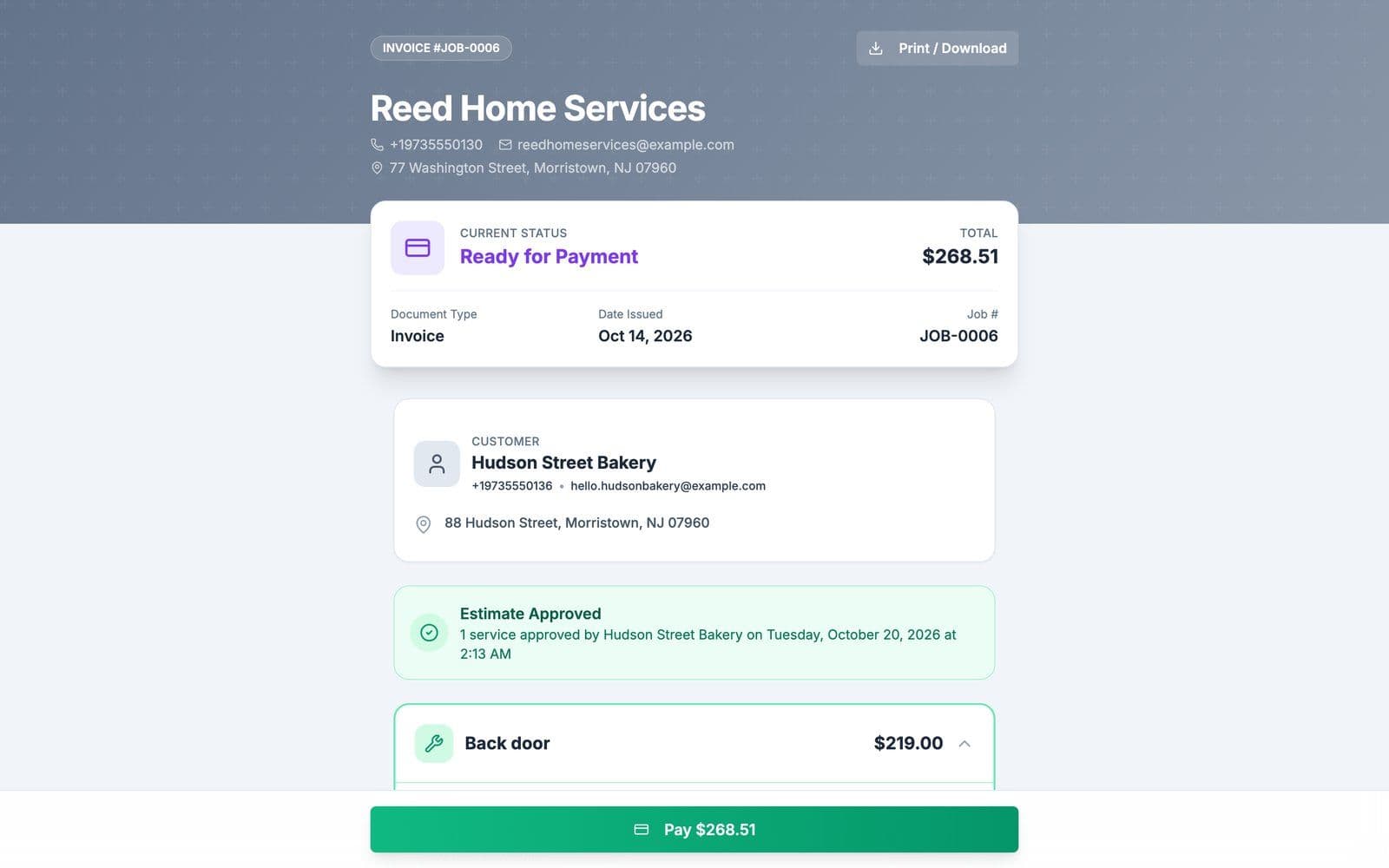
An invoice as the customer sees it: Reed Home Services, JOB-0006 for Hudson Street Bakery, ready for payment, $268.51, estimate approved, with a green Pay $268.51 button
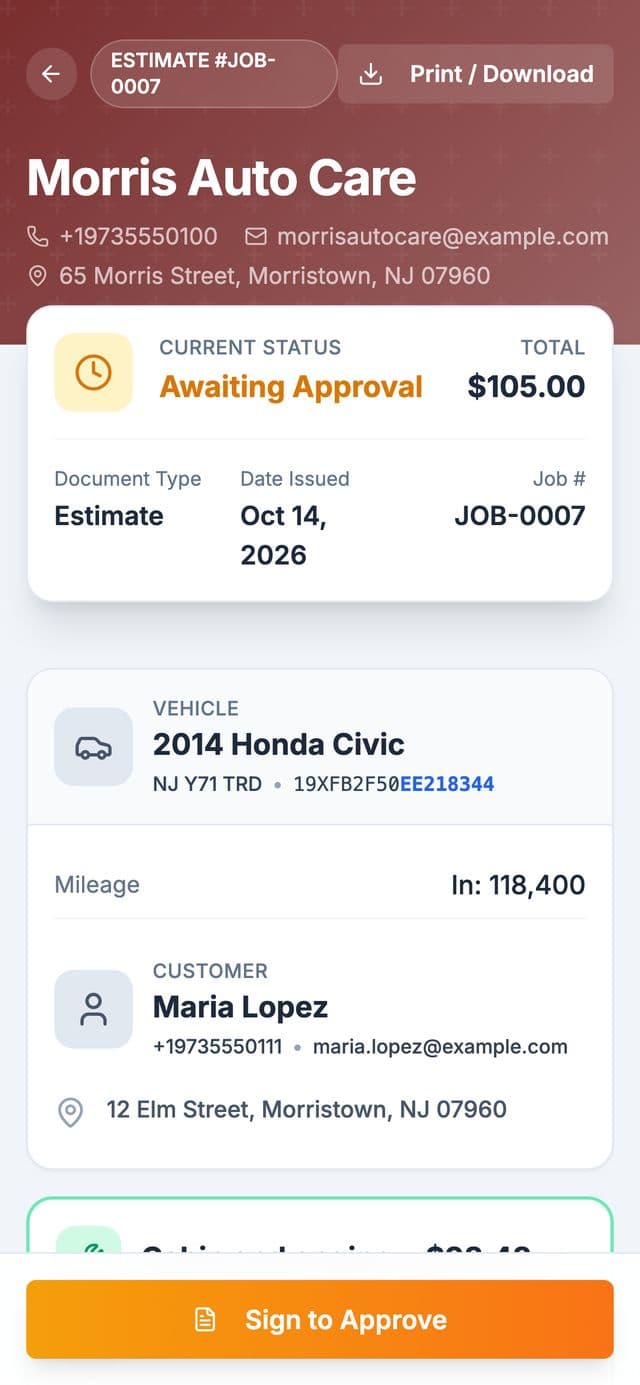
A customer's estimate on a phone from Morris Auto Care: JOB-0007 for a 2014 Honda Civic, awaiting approval, $105.00, with the Sign to Approve button
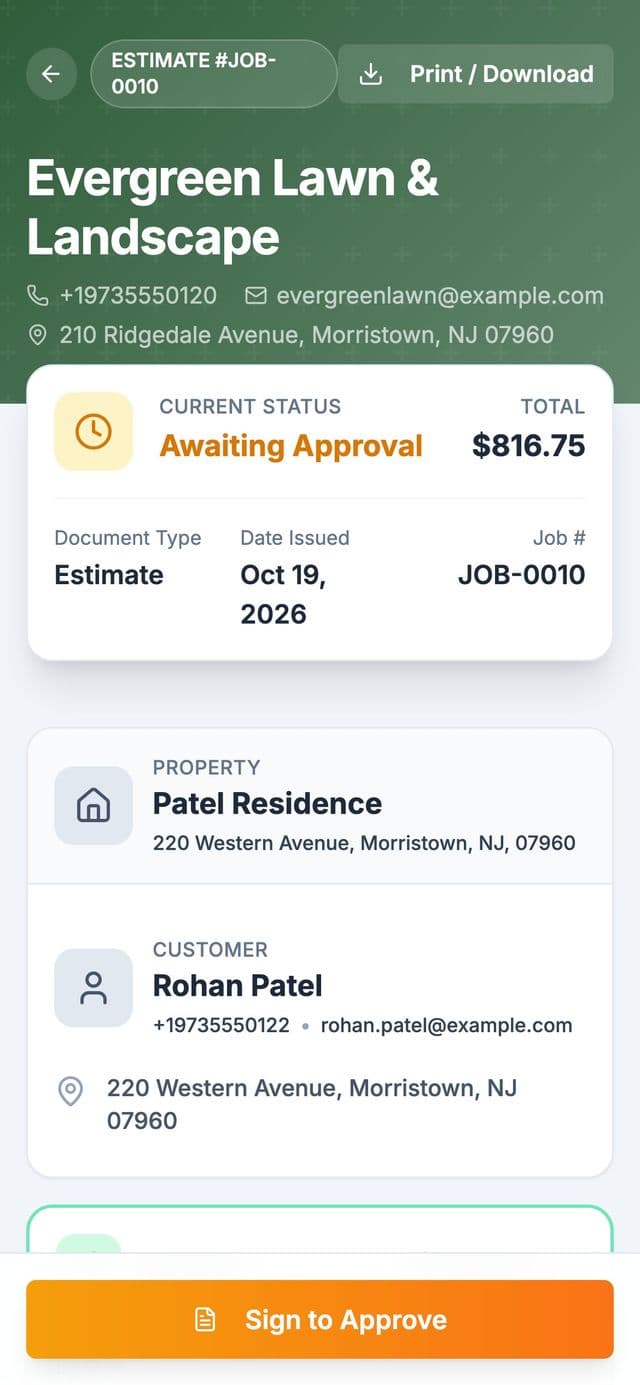
A customer's estimate on a phone from Evergreen Lawn and Landscape: JOB-0010 for the Patel Residence, awaiting approval, $816.75, with the Sign to Approve button
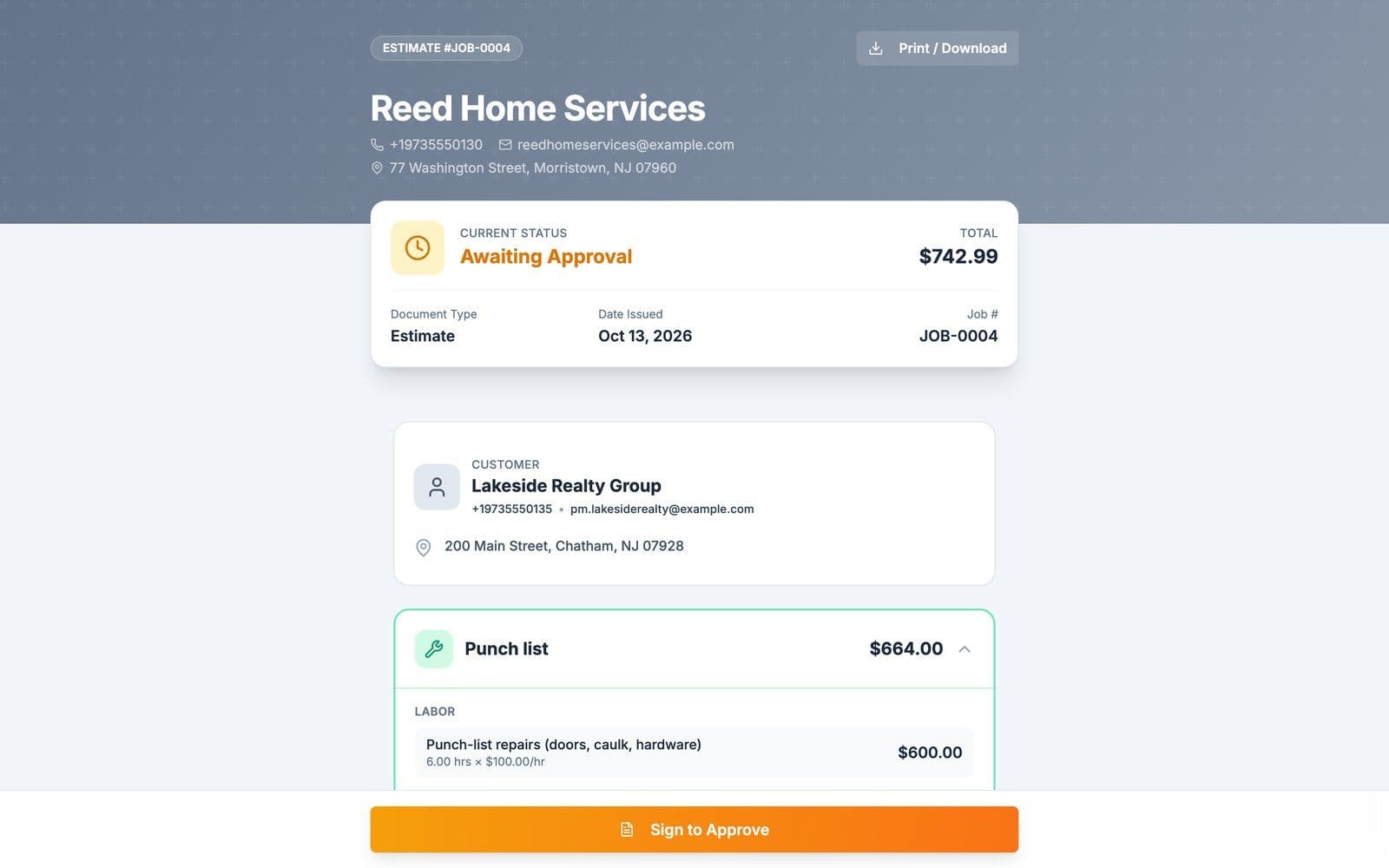
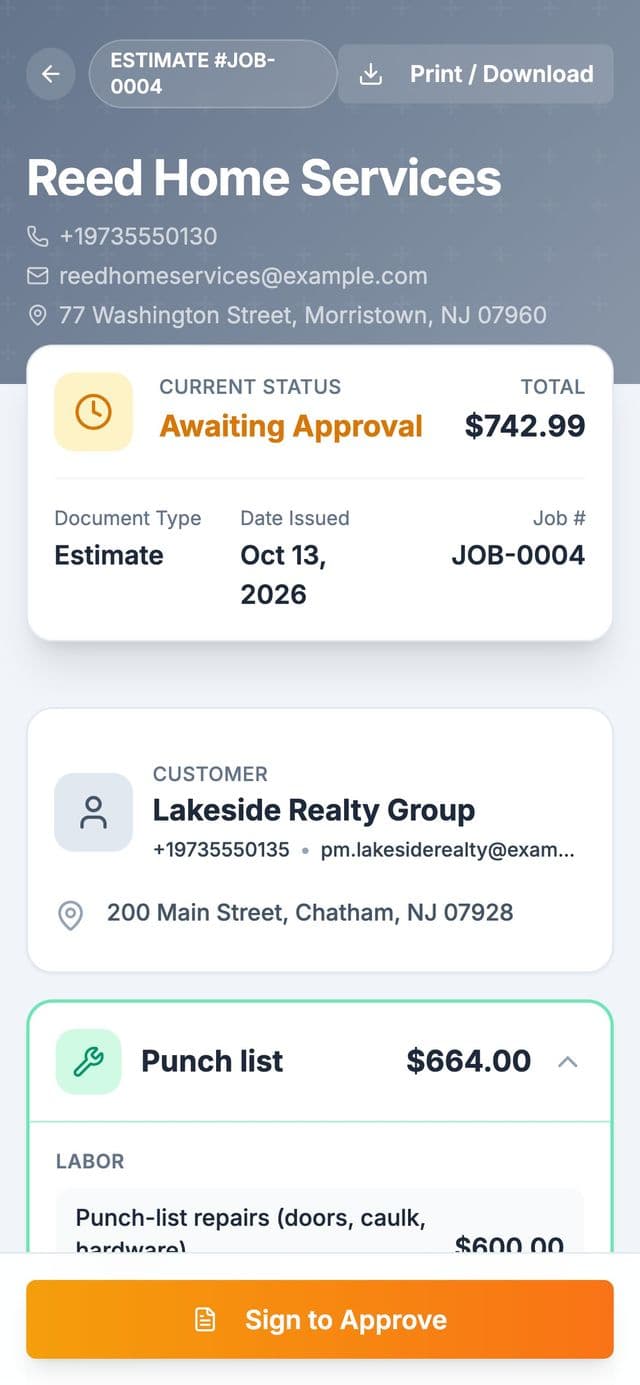
A customer's estimate on a phone from Reed Home Services: JOB-0004 for Lakeside Realty Group, awaiting approval, $742.99, with the Sign to Approve button
The job board in the browser, and an estimate the customer approves from their phone.An invoice the customer pays online, and an estimate they approve from their phone. Screens from our demo shops.
01 / 05

Win the job.

Quotes and estimates customers approve from their phone: the estimate goes out as a link, the customer signs it, and booked cars land on the schedule.

Every plan

Can I write repair estimates and quotes in Quotera?

Yes, on every plan, including Free. The estimate is the work order itself: add the jobs with their labor and parts, then email it to the customer from the work order, and they open it from a link. Signing it online starts on a paid plan.

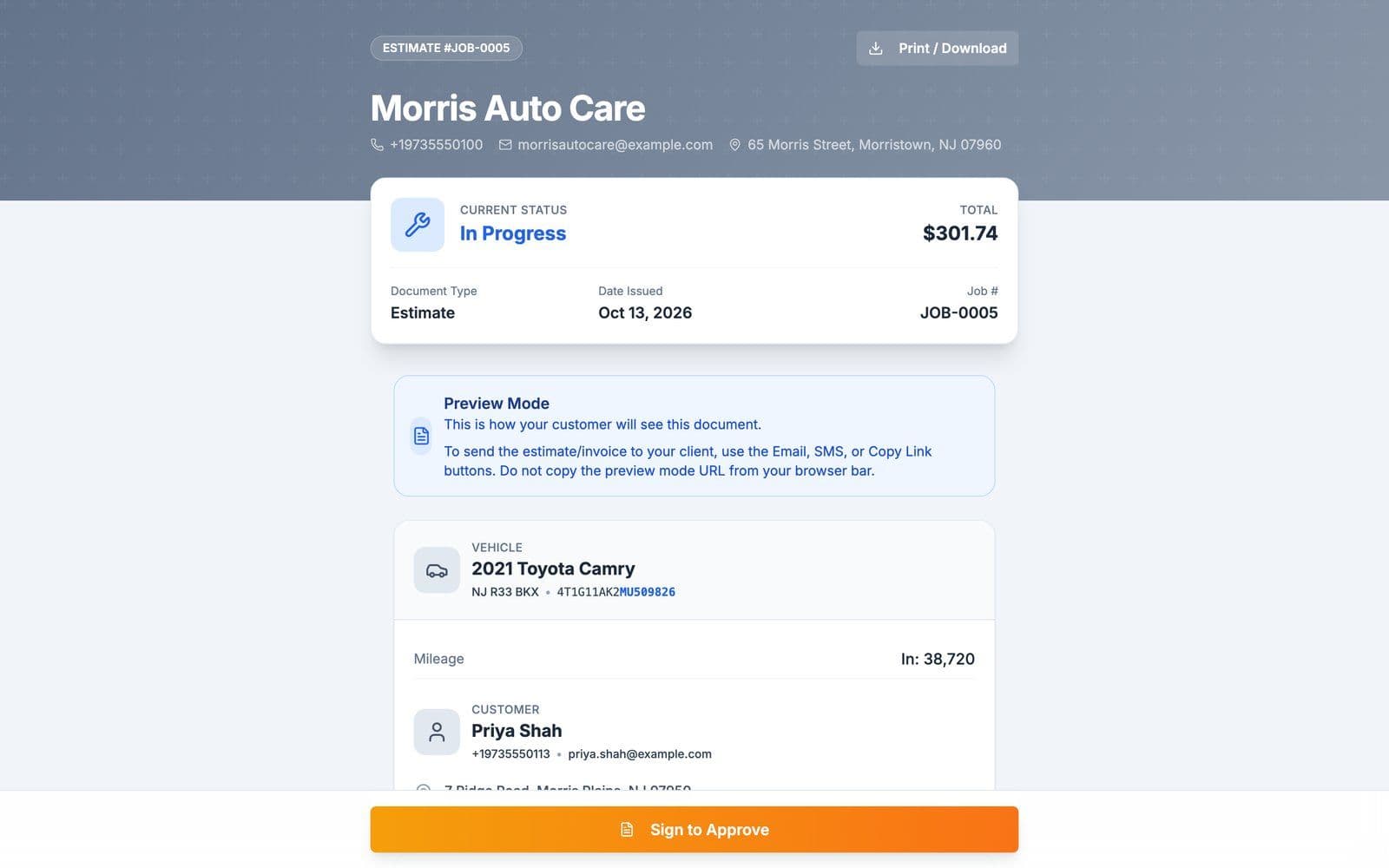
  • The estimate shows the car with its plate and VIN, so the customer knows which vehicle it is for.
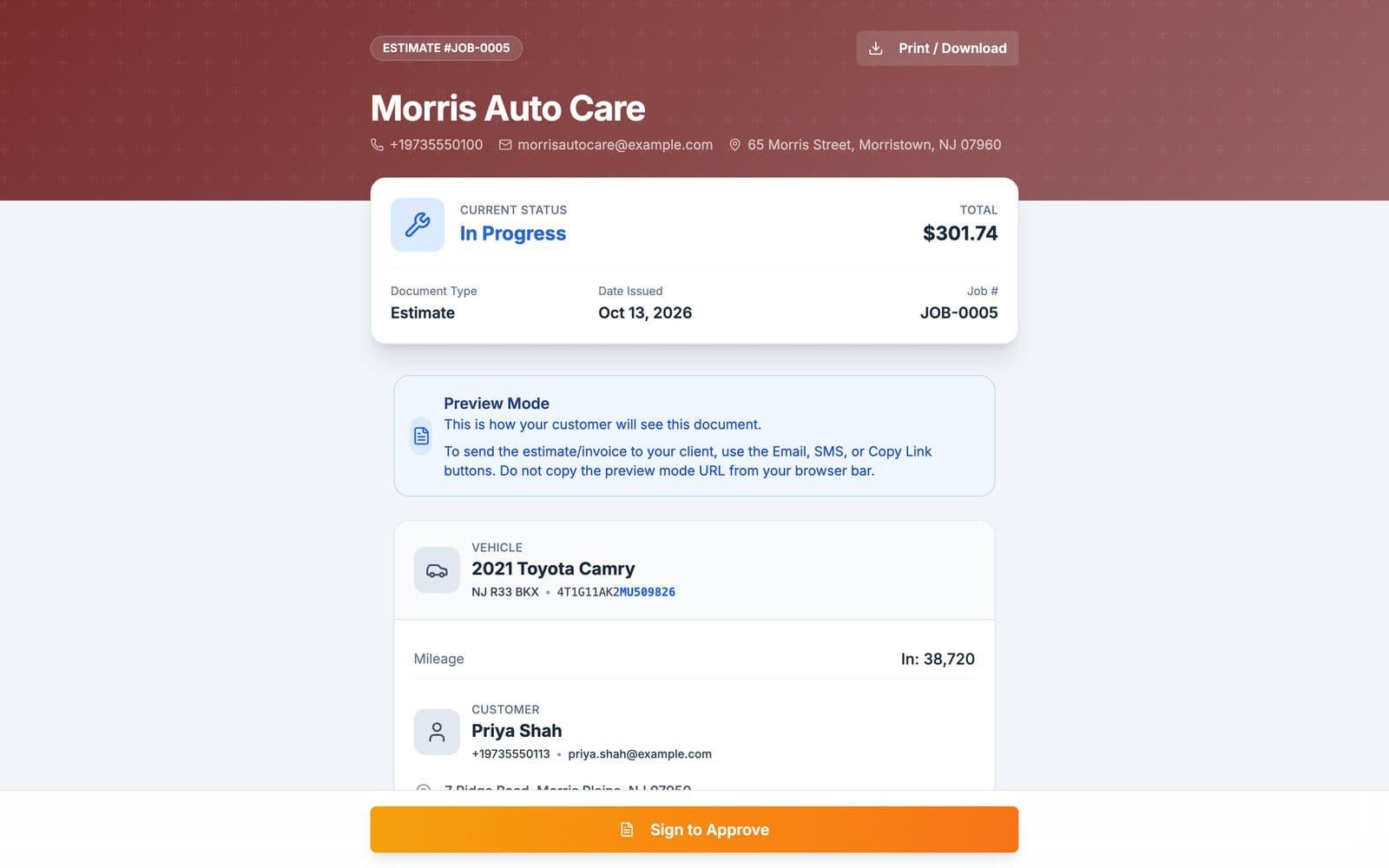
quotera.app/estimate/JOB-0005
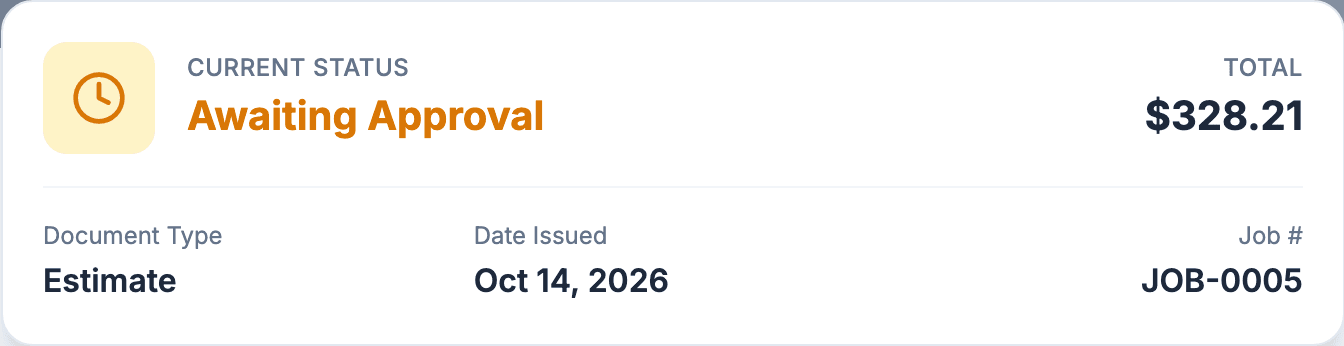
The estimate for JOB-0005 at Morris Auto Care without a custom logo or header color: $301.74, the 2021 Toyota Camry with plate NJ R33 BKX and its VIN, and the customer, Priya Shah
The estimate for Priya Shah's Camry at Morris Auto Care, our auto repair demo shop, without the logo and header color that come with Pro.
Every paid plan

Can customers approve an estimate from their phone?

Yes, on any paid plan. Customers open the estimate link and sign to approve, you get notified, and the work order status updates. Paying by card comes with the invoice: once you invoice the job, the link gets a Pay Now button if you take online payments.

  • On the Free plan you can write estimates; signing them online starts on a paid plan.
quotera.app/estimate/JOB-0005
The lower half of the JOB-0005 estimate at Morris Auto Care: the 2021 Toyota Camry with plate NJ R33 BKX and its VIN, the customer Priya Shah, and the Sign to Approve button
The foot of the JOB-0005 estimate at Morris Auto Care, where Priya taps Sign to Approve. It opens a sheet where she signs with her name.
Every paid plan

Can customers book their car in online?

Yes, on any paid plan: you set your days, time slots and booking window, and customers pick a service, enter their car and choose a time on your page at quotera.app/book/your-shop-name.

  • When a customer books, you get a notification and accept or decline the request on the Appointments page. An accepted booking can create its work order for you.
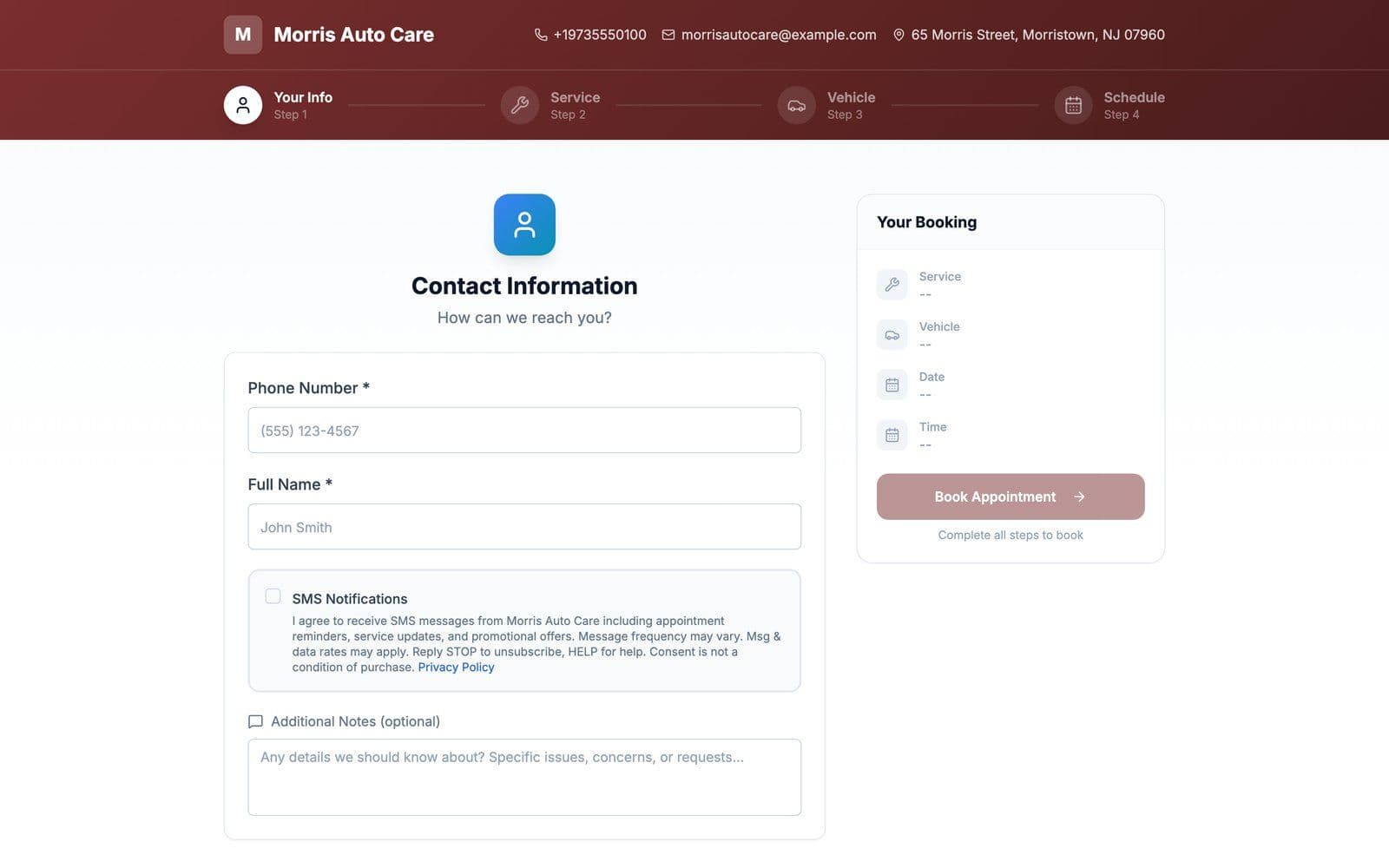
quotera.app/book/your-shop
Morris Auto Care's public booking page under its dark red header: four steps, your info, service, vehicle and schedule, with a Your Booking summary
The booking page of Morris Auto Care, our auto repair demo shop. Logo and header color: Pro and up.
From Pro

Can I see my schedule on a calendar?

Yes, on Pro and Max. The calendar shows appointments, scheduled work and blocked days side by side, by month or by day, with drag-and-drop scheduling.

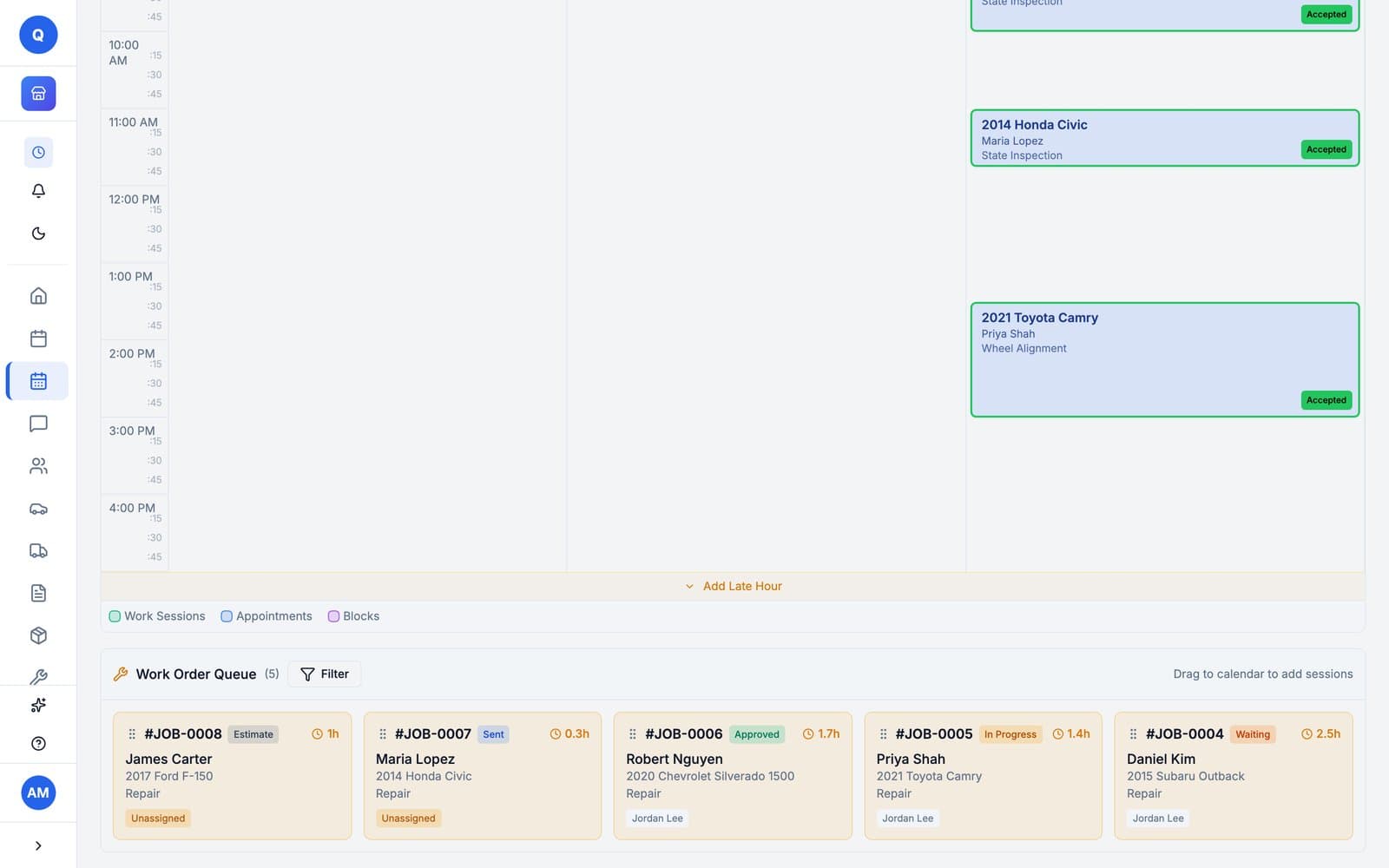
quotera.app/calendar
The calendar's day view: Priya Shah's 2021 Toyota Camry booked for a wheel alignment in Jordan Lee's column, accepted, with the work order queue below
The day view at Morris Auto Care: Priya Shah's Camry booked in Jordan Lee's column.
02 / 05

Do the work.

One work order per car: the customer, the vehicle, the labor, the parts and the photos, and a way to reach the customer from it.

Every plan

Can I keep the job, the car and its photos on one work order?

Yes. A work order holds the customer, the car with its VIN, plate and mileage, the jobs with their labor and parts, and the photos you upload from your device or take with your phone's camera. Free allows 3 photos per work order and Basic 10; Pro and Max set no limit.

  • The Free plan covers your first 10 work orders in total, with no time limit.
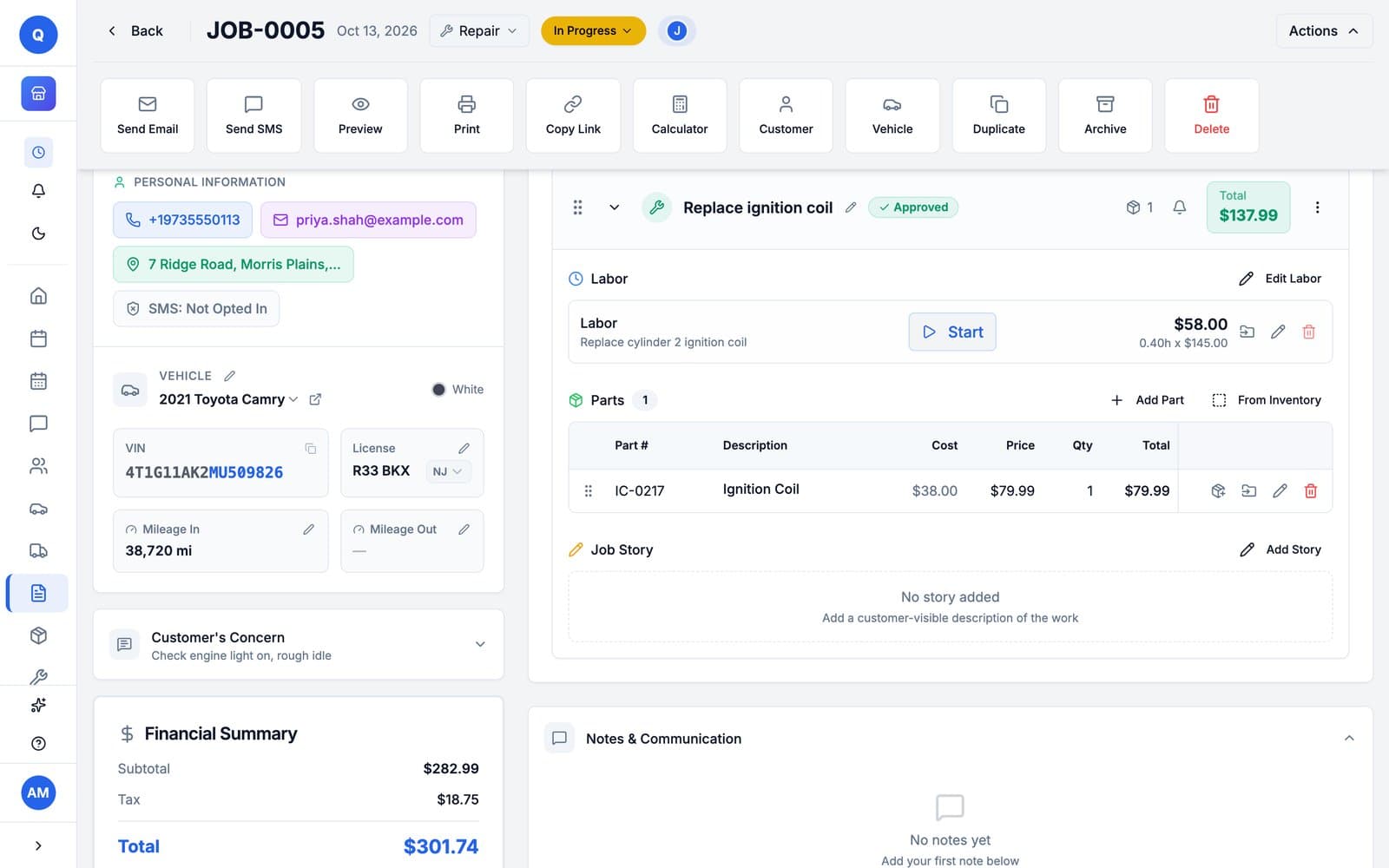
quotera.app/work-orders/JOB-0005
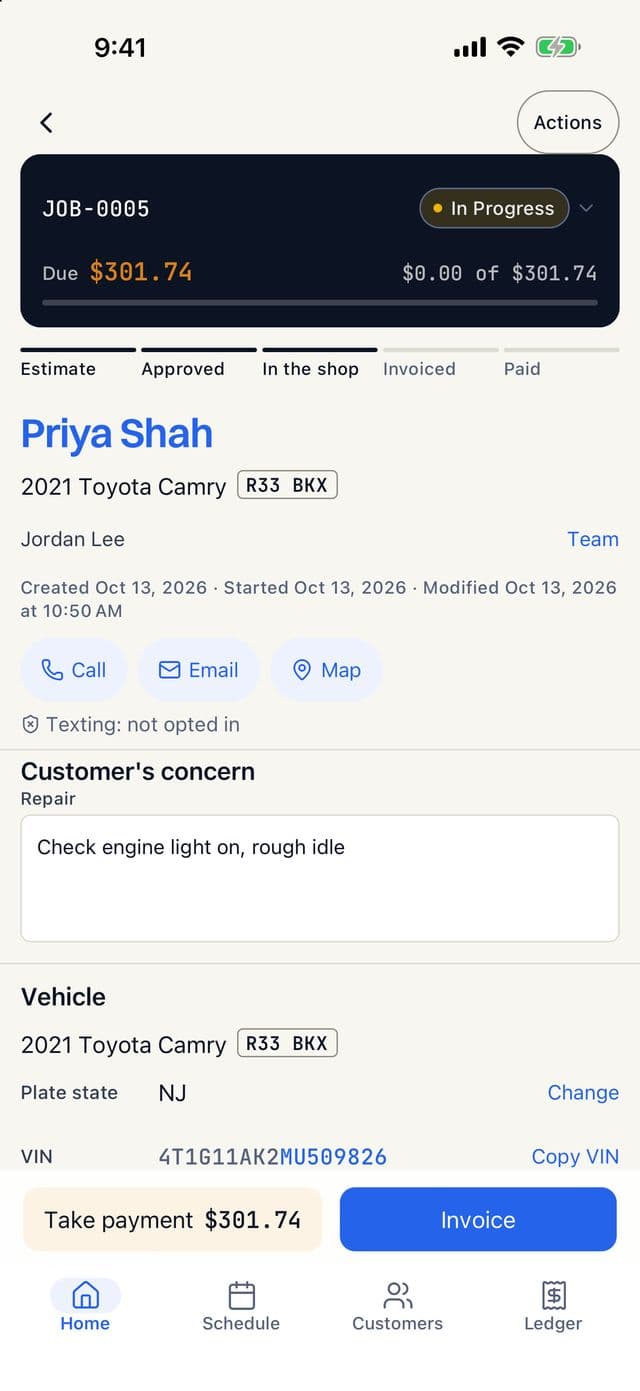
Work order JOB-0005: the customer, the 2021 Toyota Camry with its VIN, plate R33 BKX and 38,720 miles, the customer's concern, and the Replace ignition coil job with its labor and part
JOB-0005 on Morris Auto Care: Priya Shah's Camry in for a rough idle.
From Pro

Can I run a digital vehicle inspection and send it to the customer?

Yes, on Pro and Max for auto repair shops. Run an inspection from a preset checklist and send the results to the customer as a link.

Every plan

Does Quotera keep each customer's vehicles and their service history?

Yes. Pick one of the customer's vehicles or add a new one when you create a work order, and its service history builds automatically. The Free plan holds up to 50 customers and 50 vehicles; paid plans set no limit.

  • Moving over? Import your customers and their vehicles from a CSV file on any paid plan.
quotera.app/vehicles
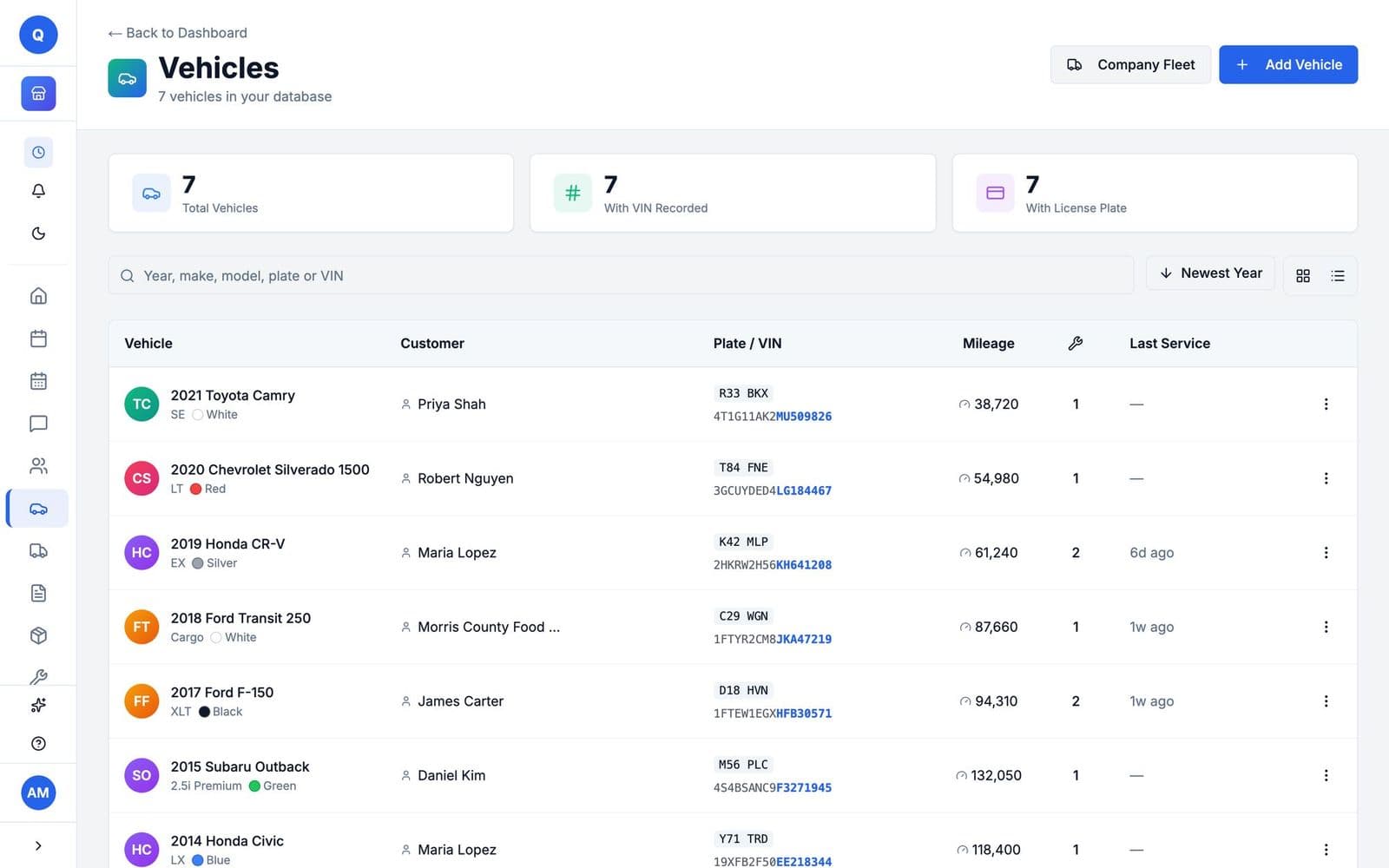
The vehicle list: each car with its customer, plate, VIN, mileage, job count and last service
Every car on Morris Auto Care, with its plate, VIN, mileage and last service.
Every paid plan

Can I bring my customers and their vehicles over from my old software?

Yes, your customers and their vehicles, from a CSV file. In Quotera, go to Settings, then Import, upload the file and map your columns; customers you already have, with the same email or phone, are flagged and skipped. Customers and their vehicles import on every paid plan for auto repair shops, and in the free trial. The Free plan cannot import. Past work orders and invoices do not import. Contact support and we will work out the options with you.

Every planemailEvery paid plantexting

Can I text and email customers from Quotera?

Yes. Emailing estimates and invoices works on every plan, including Free, and customer replies show up as threaded conversations. Texting starts on Basic with 50 one-way texts a month; Pro has 200 a month with two-way conversations and freeform replies; Max has no monthly cap and adds photo texts and saved templates. Texting is not part of the free trial or the Free plan.

  • US carriers require every business to register before it texts customers, and registration asks for your business's own website. You start it from Settings, under Connections. No website yet? We build them.
quotera.app/work-orders/JOB-0005
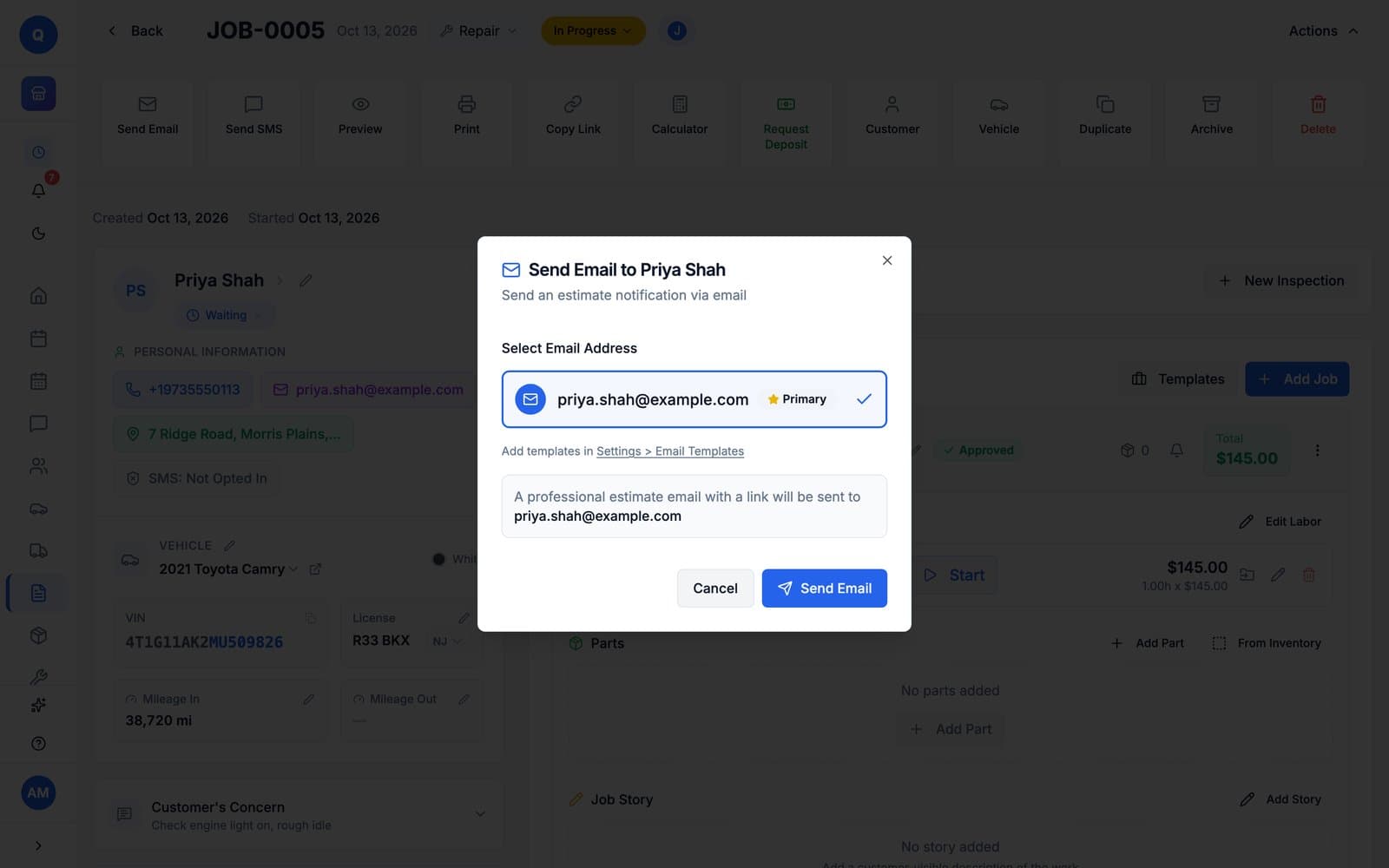
The Send Email to Priya Shah dialog on work order JOB-0005: her primary email address selected, and a note that a professional estimate email with a link will be sent to it
Sending the estimate for JOB-0005 by email, on Morris Auto Care: the customer gets a link to it.
Max

Can Quotera remind customers before their appointment?

Yes, on Max: attach a reminder when you book and it goes out by text or email before the appointment. On Basic and Pro, you can send an appointment reminder text by hand from the work order; it counts toward your monthly texts.

03 / 05

Tools for your trade.

Built for the bay: CARFAX and the VIN at check-in, and parts from stock or the catalog onto the job. No add-ons to buy.

Every paid plan

Does Quotera work with CARFAX?

Yes, on any paid plan for auto repair shops. Look up a VIN from a license plate, pull a vehicle's service history into the work order, and Quotera sends your completed work orders to CARFAX every day. You can also enter a 17-character VIN and Quotera fills in the year, make and model. CARFAX is included in the trial. The CARFAX Shop Loyalty Program needs a paid plan.

  • Connect CARFAX once in Settings, under Connections.
CARFAX
quotera.app/vehicles/new
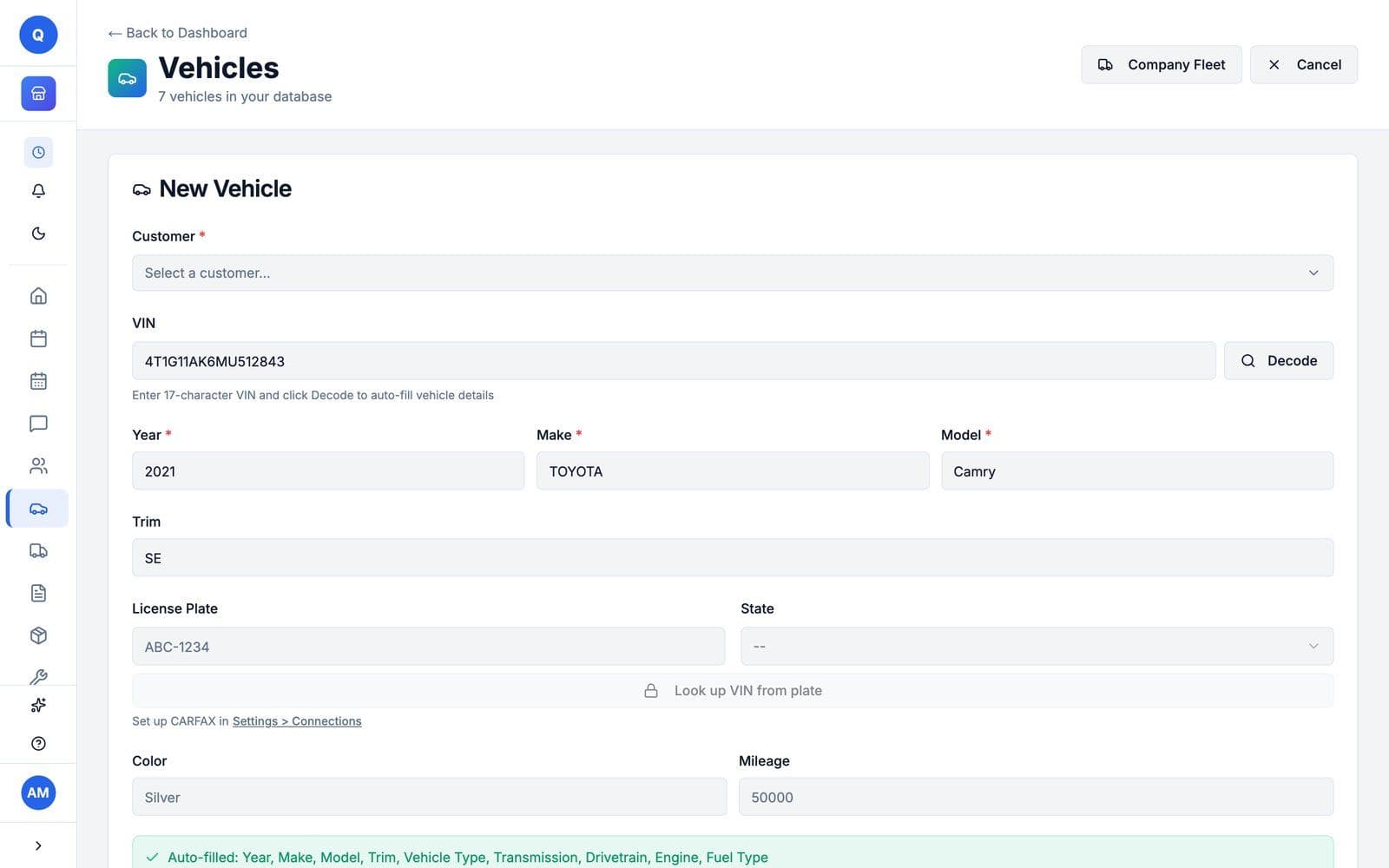
New Vehicle: a 17-character VIN decoded to a 2021 Toyota Camry SE, with a note that year, make, model, trim, vehicle type, transmission, drivetrain, engine and fuel type were auto-filled
A VIN decoded on a new vehicle at Morris Auto Care: year, make, model and trim filled in. The Look up VIN from plate button below it is the CARFAX part; it opens once CARFAX is connected.
Every paid plan

Can I track parts and see what is running low?

Yes, on any paid plan. Basic tracks up to 50 parts, Pro 250, and Max sets no limit. Parts on a work order come out of stock when the estimate is approved, and parts below their minimum show a Low Stock badge.

  • Purchase orders and receiving live on the same page as your stock.
quotera.app/inventory
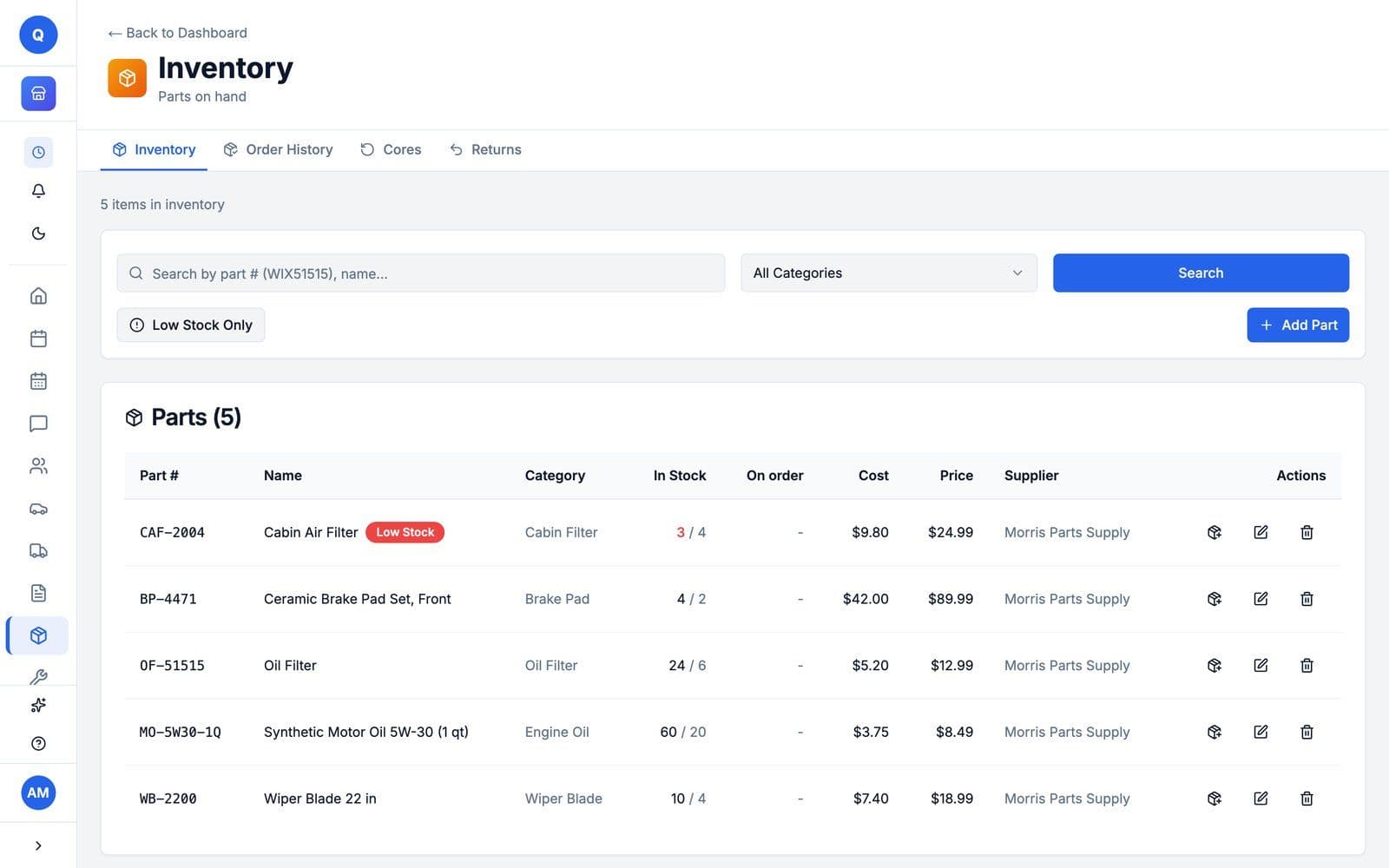
Inventory, parts on hand: five parts with stock against their minimum, cost, price and supplier, and a red Low Stock badge on the cabin air filter
Parts on hand at Morris Auto Care, with the cabin air filter flagged Low Stock.
Every paid plan

Can I order parts from Nexpart in Quotera?

Yes, on any paid plan for auto repair shops. With an existing Nexpart account, you can order from the Nexpart Multi-Seller catalog right on the work order.

Nexpart Multi-Seller

Nexpart: Contains proprietary and copyright materials supplied under license by various third parties listed on the About page of the main menu.

04 / 05

Get paid.

The invoice comes from the work order. The customer pays by card from the link, or you record cash and checks yourself.

Every plan

Can I turn the job into an invoice and record how the customer paid?

Yes, on every plan, including Free. The invoice comes from the same work order, so nothing is typed twice. Email it to the customer from the work order, and record cash, checks and other payments yourself with Add Payment; payments you record have no fee.

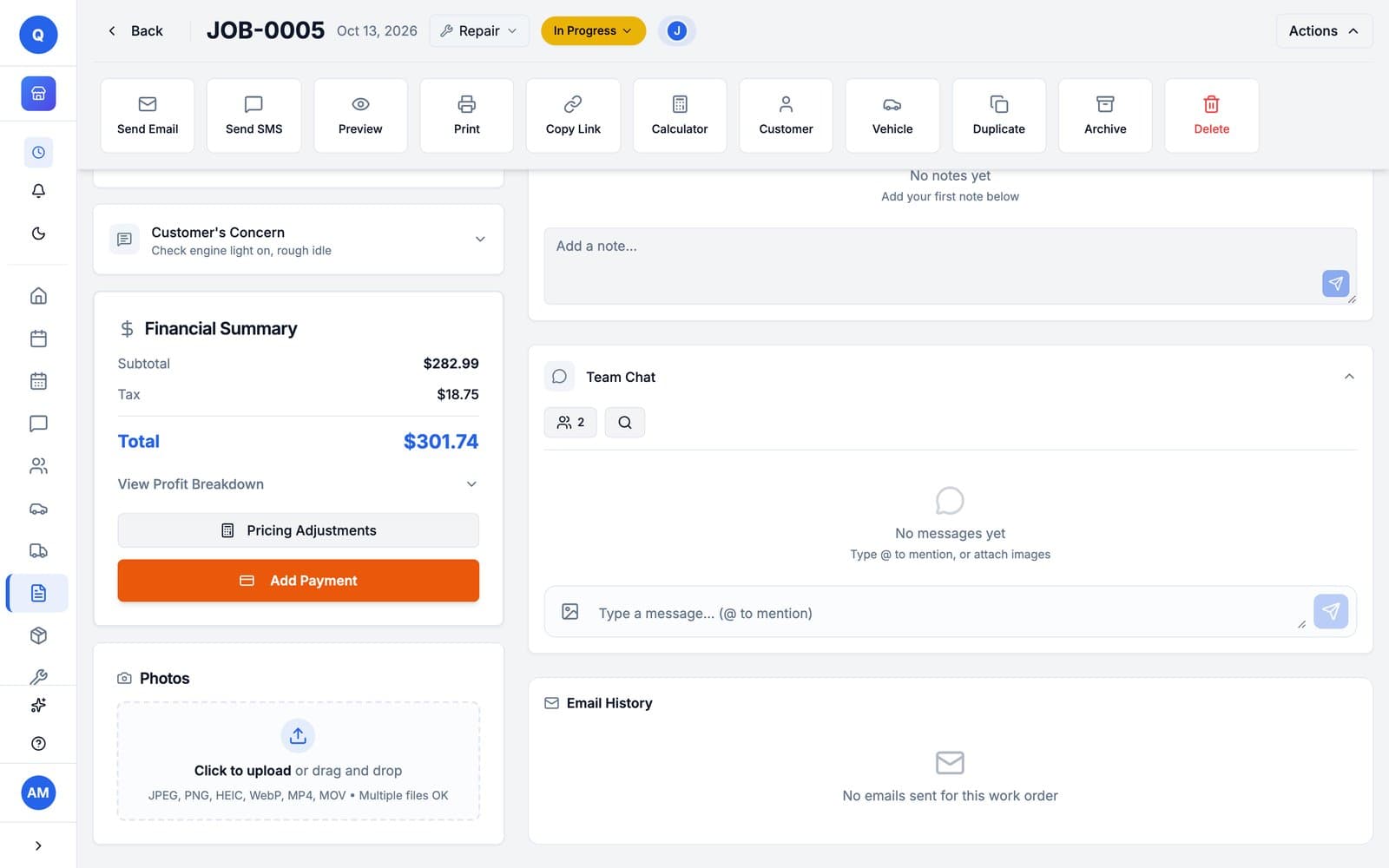
quotera.app/work-orders/JOB-0005
JOB-0005's financial summary: subtotal $282.99, tax $18.75, total $301.74, with the Add Payment button
The total on JOB-0005, next to Add Payment, where you record cash or a check.
Every paid plan

Can customers pay an invoice by card from their phone?

Yes, on any paid plan. Connect Stripe, and the invoices you send get a Pay Now button; customers pay by credit or debit card, and the money goes to your Stripe account, then your bank. Each online card payment has Stripe's fee (2.9% + 30¢) and a Quotera platform fee (1% + 20¢), taken out before payout. Cash, checks and payments you record yourself have no fee.

Online card payments
3.9% + 50¢
Cash, checks, recorded payments
$0
  • On a $1,000 card payment you keep $960.50.
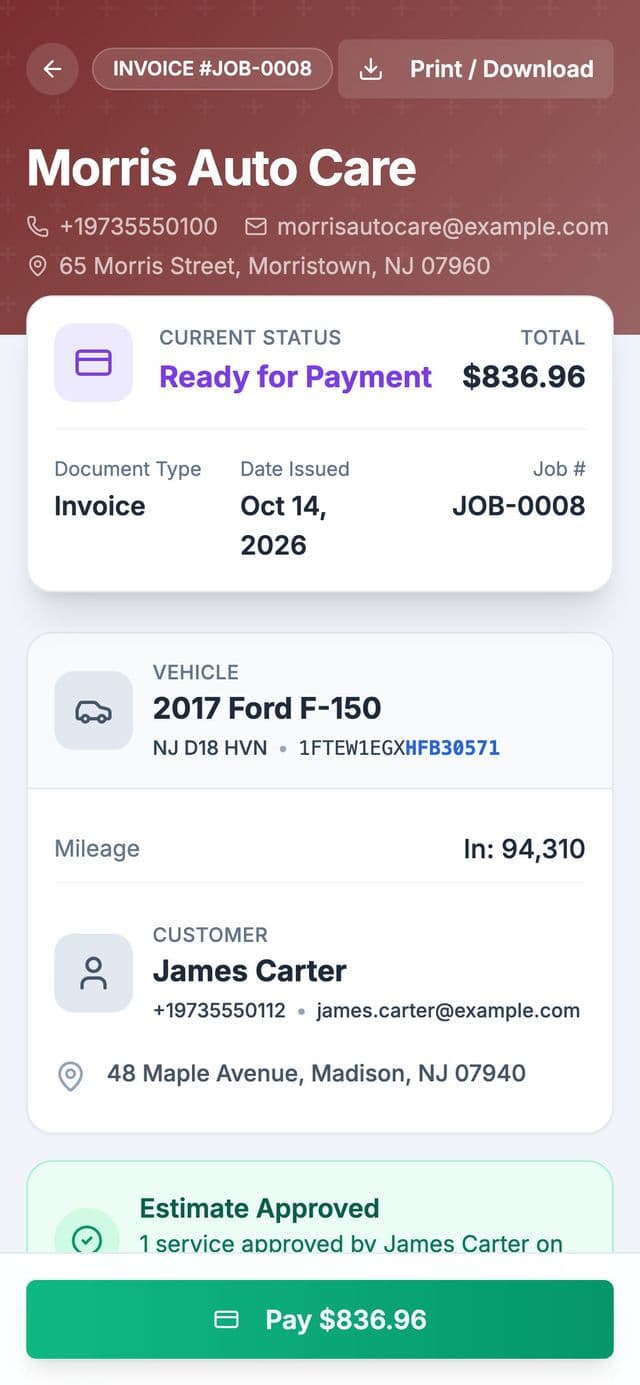
The invoice on the customer's phone under Morris Auto Care's dark red header: JOB-0008 for James Carter's 2017 Ford F-150, ready for payment, $836.96, with a green Pay $836.96 button at the bottom

1The customer taps Pay

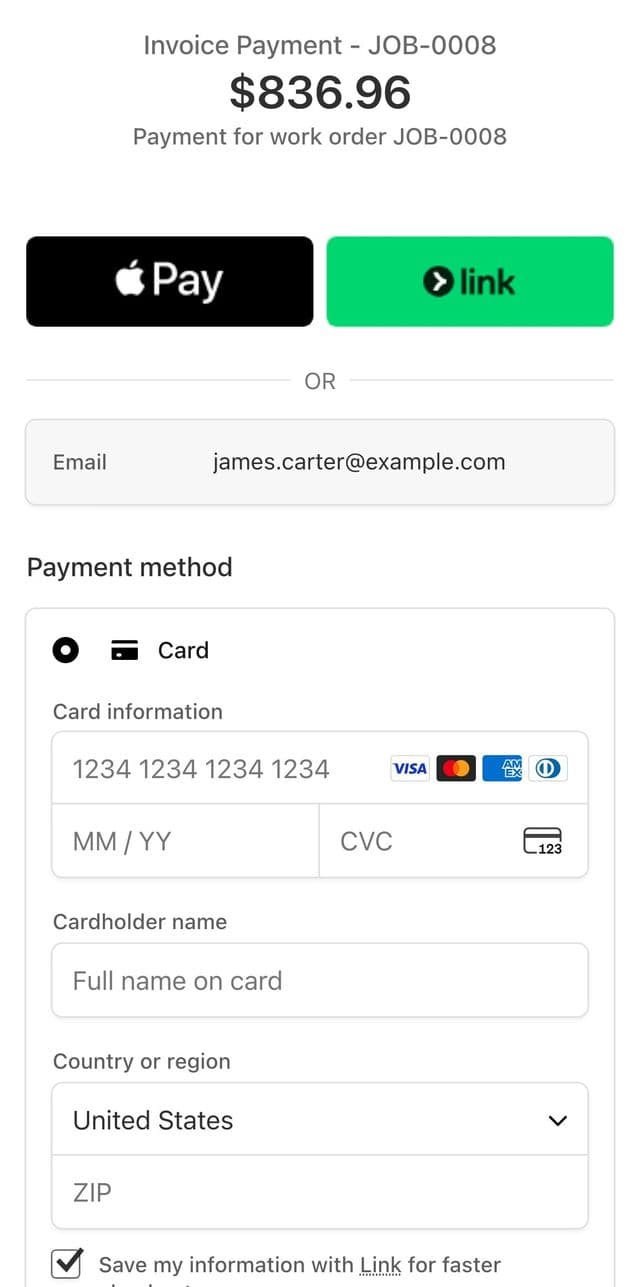
Stripe's checkout page on the phone: Invoice Payment, JOB-0008, $836.96, with Apple Pay, Link and a card form

2They pay by card on Stripe

A demo invoice from Morris Auto Care, our auto repair demo shop, with Stripe in test mode. No card was entered and nothing was charged. Logo and header color: Pro and up.
Every paid plan

Can I see what came in and export it for my accountant?

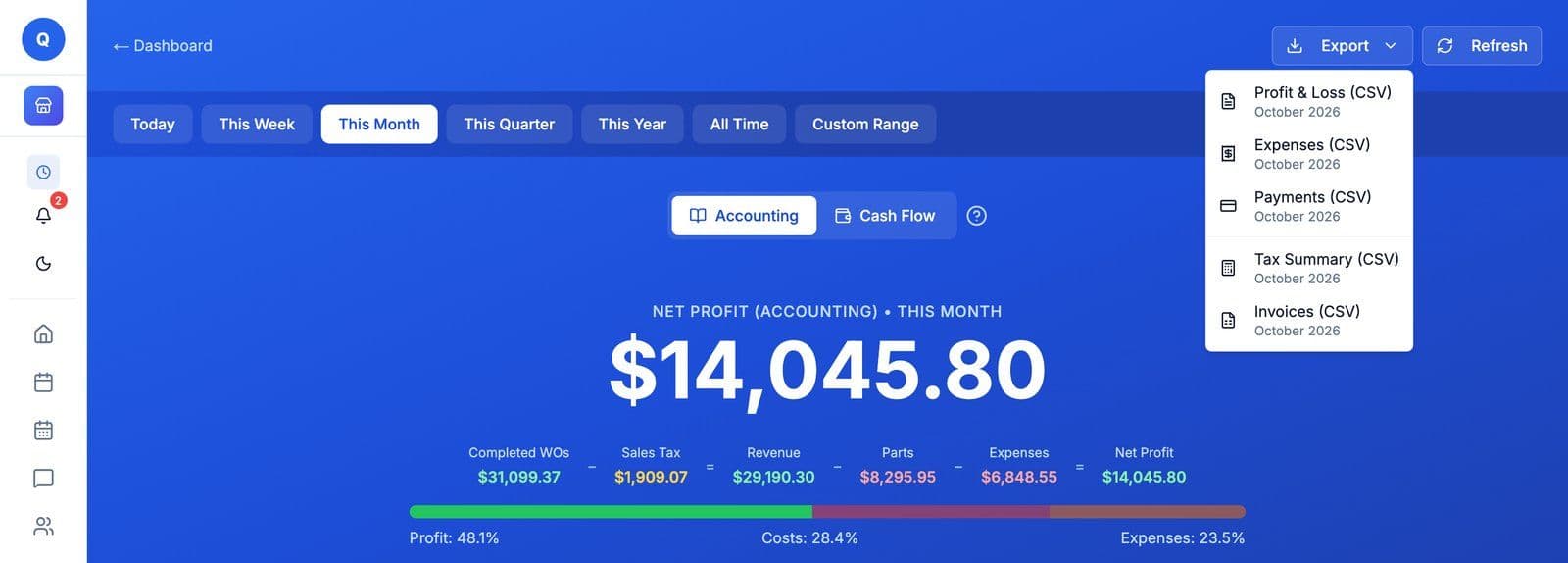
Yes, on any paid plan. The Reports page shows revenue, profit and loss, expenses, payments and sales tax, and exports five CSV files: profit and loss, expenses, payments, tax summary and invoices.

  • Expenses for rent, tools and supplies feed the profit numbers, on every paid plan.
  • Export your reports to CSV for your bookkeeper or accountant.
quotera.app/reports
Reports, Accounting, October 2026: net profit $14,045.80 on $29,190.30 in revenue, after $8,295.95 in parts and $6,848.55 in expenses, with the Export menu open on five CSV files: Profit and Loss, Expenses, Payments, Tax Summary and Invoices
October at Morris Auto Care, our auto repair demo shop, with the Export menu open. Demo shop figures.
05 / 05

Run the shop.

Give your techs their own logins, and bring customers back without writing every message yourself.

Every paid plan

Can my techs have their own logins?

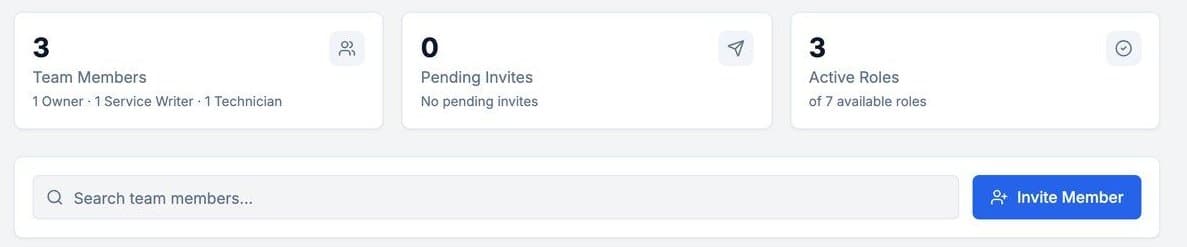
Yes, on any paid plan. Basic covers up to 5 people, and Pro and Max set no limit. Each person gets a role, from the preset auto shop roles or ones you build, and you can assign work orders to the techs doing them.

  • Auto shops start with Owner, Manager, Service Writer, Technician, Shop Foreman, Parts Manager and Bookkeeper.
quotera.app/team/members
Manage My Team: 3 team members, 1 owner, 1 service writer and 1 technician, no pending invites, 3 of 7 roles in use, and an Invite Member button
The team on Morris Auto Care: an owner, a service writer and a technician.
Max

Can Quotera bring customers back and ask for reviews?

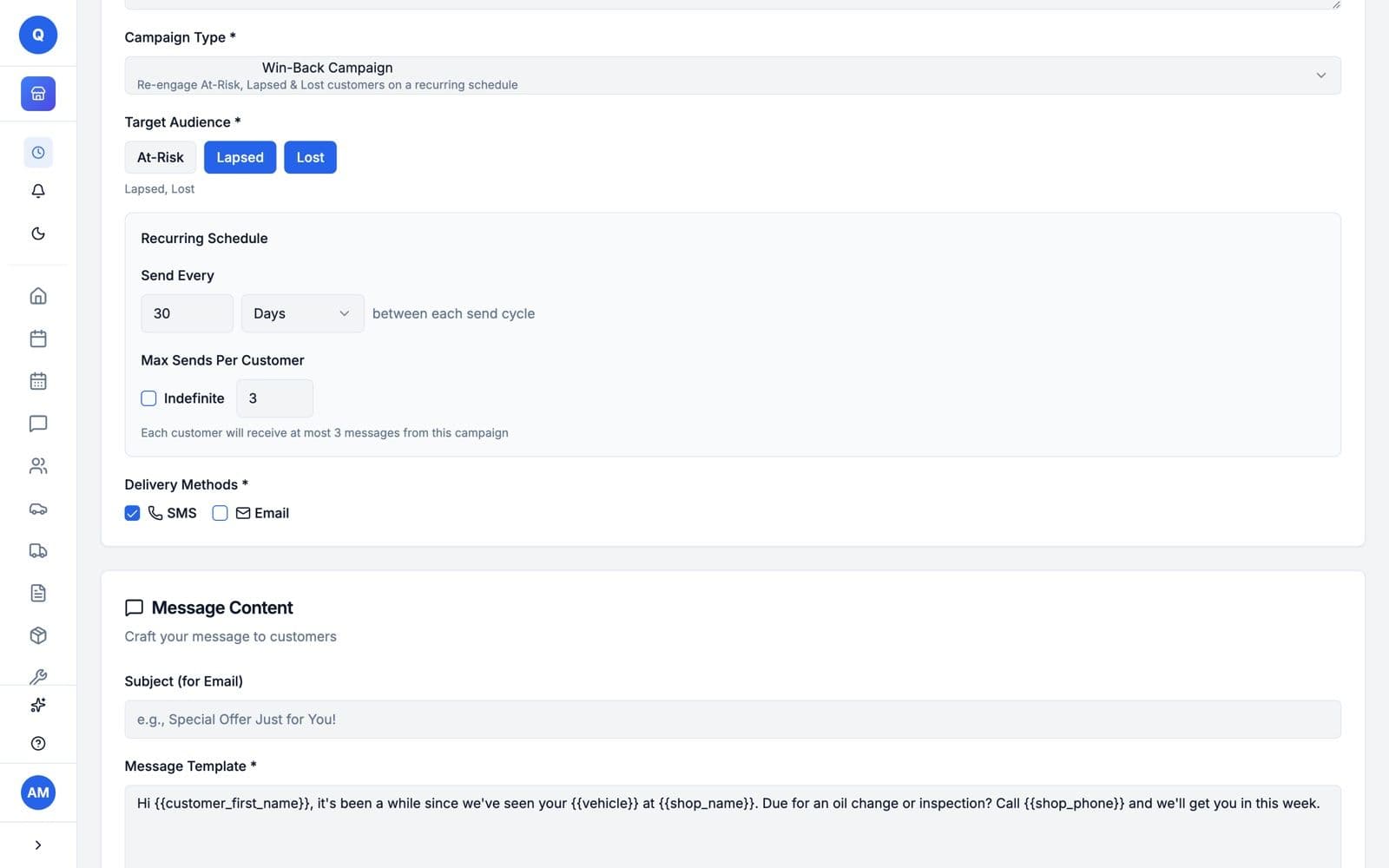
Yes, on Max. The Marketing Center sends win-back messages to customers who have not been back in a while, service reminders and a thank-you after the job, by email, or by text to customers who agreed to offers. It can also put your Google review link on the estimates and invoices customers sign.

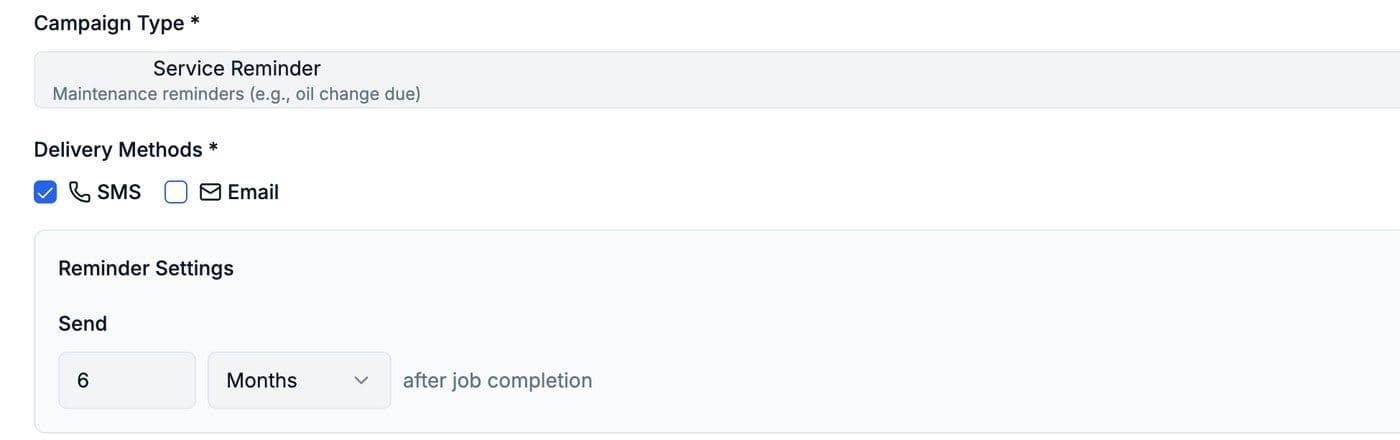
  • Service reminders go out a set time after the job, like 6 months after an oil change, by email, or by text to customers who agreed to offers.
  • Other campaigns follow up on estimates waiting for approval, unpaid invoices and declined work, and remind customers before an appointment.
quotera.app/marketing/campaigns
Setting up a win-back campaign in the Marketing Center: Lapsed and Lost customers, sent every 30 days, at most 3 messages per customer, by text, with the message template below
Setup screens on Morris Auto Care. The campaigns are drafts, so there are no results to show.
Before you sign up

Three more things owners ask.

Every paid plan

Do my customers need to download an app to approve or pay?

No. On any paid plan, your customer opens the estimate from a link in their phone's browser and signs to approve it, then pays the invoice by card the same way if you take online payments. Nothing to download. You send the link from the work order, by email, or by text to customers who opted in to texts. Texting starts when you subscribe.

Every plan

Does Quotera work on a Mac or a Windows PC?

Yes. Quotera runs in your web browser on a Mac or Windows computer, with nothing to install.

Every plan

Does Quotera work on my phone?

Yes. Quotera runs in your phone's web browser, with nothing to install.

01 / 05

Win the job.

Quotes and estimates customers approve from their phone: the estimate goes out as a link, the customer signs it, and booked visits land on the schedule.

Every plan

Can I write estimates and quotes in Quotera?

Yes, on every plan, including Free. The estimate is the work order itself: add the jobs with their labor and materials, then email it to the customer from the work order, and they open it from a link. Signing it online starts on a paid plan.

  • The estimate names the property, so the customer knows which site the work is for.
quotera.app/work-orders/JOB-0010
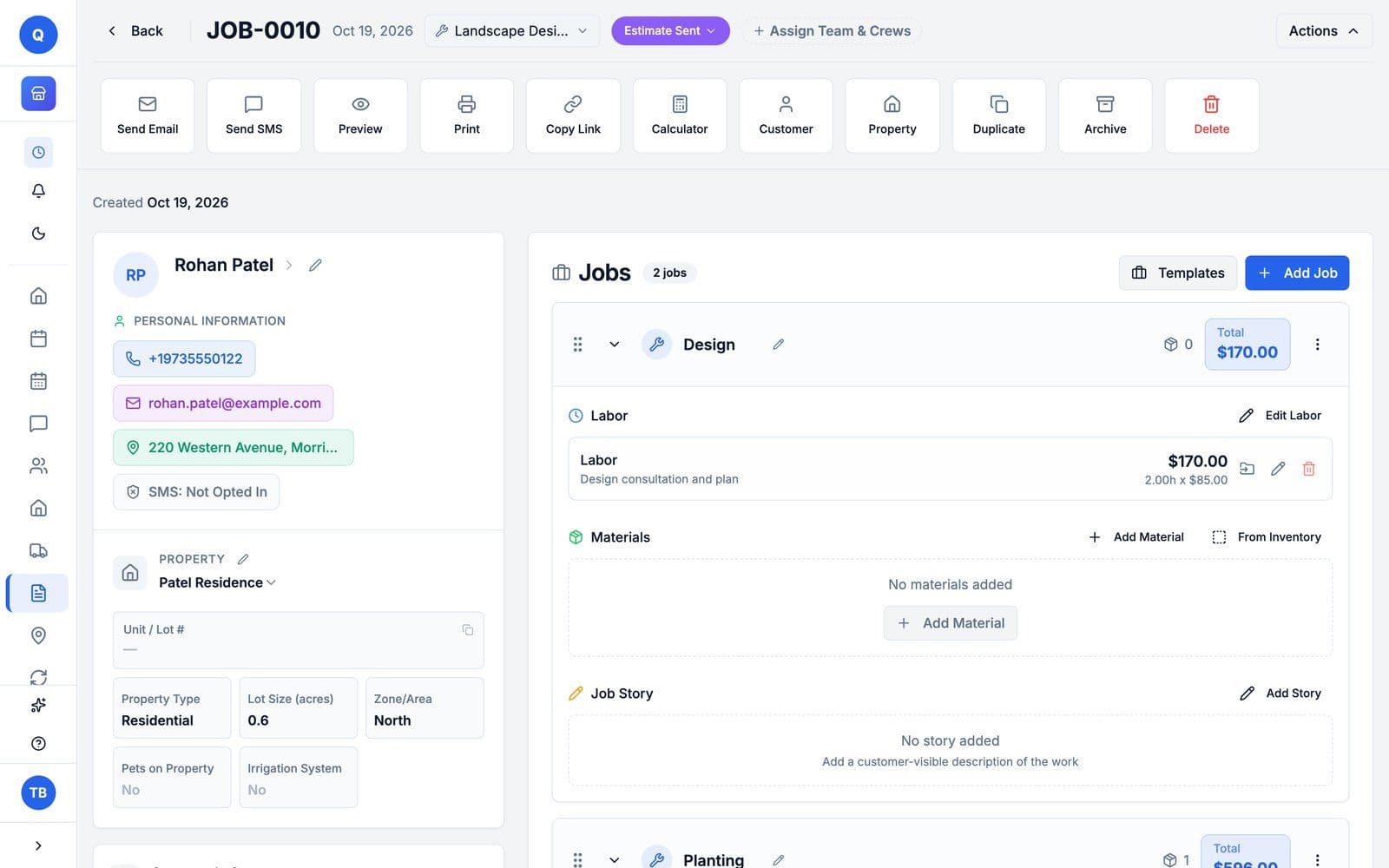
The owner's screen for estimate JOB-0010: Estimate Sent, the customer and the property card for the Patel Residence, residential, 0.6 acres, North zone, and the Design job at $170.00
The estimate for the Patel Residence on the owner's screen at Evergreen Lawn & Landscape, our landscaping demo shop.
Every paid plan

Can customers approve an estimate from their phone?

Yes, on any paid plan. Customers open the estimate link and sign to approve, you get notified, and the work order status updates. Paying by card comes with the invoice: once you invoice the job, the link gets a Pay Now button if you take online payments.

  • On the Free plan you can write estimates; signing them online starts on a paid plan.
The estimate on the customer's phone, under Evergreen Lawn and Landscape's green header: awaiting approval, $816.75, for the Patel Residence, with Sign to Approve at the bottom
The same estimate as Rohan Patel opens it on his phone, with Sign to Approve at the bottom. Logo and header color: Pro and up.
Every paid plan

Can customers book a visit online?

Yes, on any paid plan: you set your days, time slots and booking window, and customers request a visit on your page at quotera.app/book/your-business-name.

  • Share the booking page on your website, your Google listing or social media.
quotera.app/book/your-business
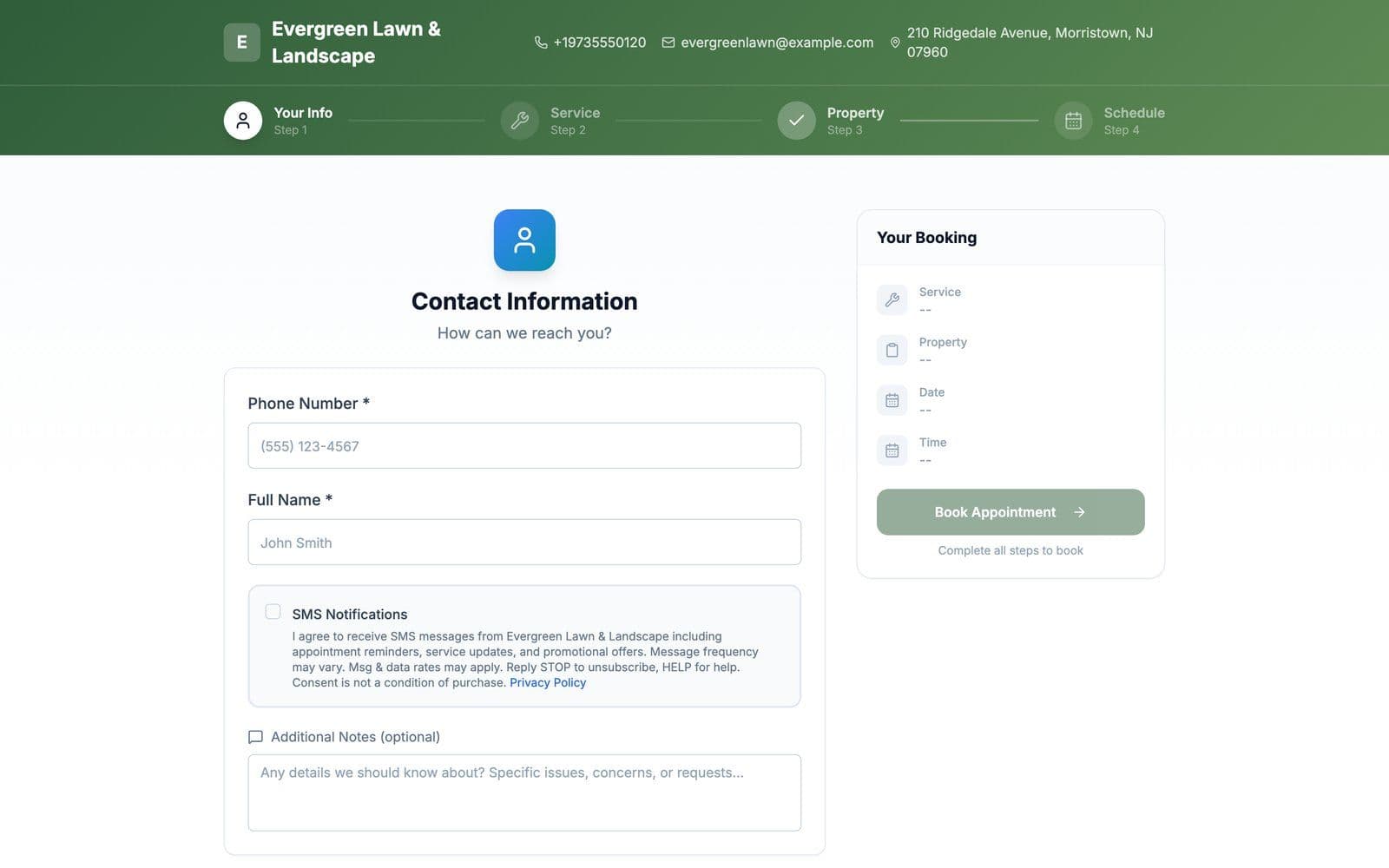
Evergreen Lawn and Landscape's public booking page under its green header: four steps, your info, service, property and schedule, with a Your Booking summary
The booking page of Evergreen Lawn & Landscape, our landscaping demo shop. Logo and header color: Pro and up.

How a booking reaches you

  1. 1The customer picks a time on your booking page.
  2. 2You get a notification, then accept or decline the request on the Appointments page.
  3. 3An accepted booking can create its work order for you.
From Pro

Can I see my schedule on a calendar?

Yes, on Pro and Max. The calendar shows appointments, scheduled work and blocked days side by side, by month or by day, with drag-and-drop scheduling.

quotera.app/calendar
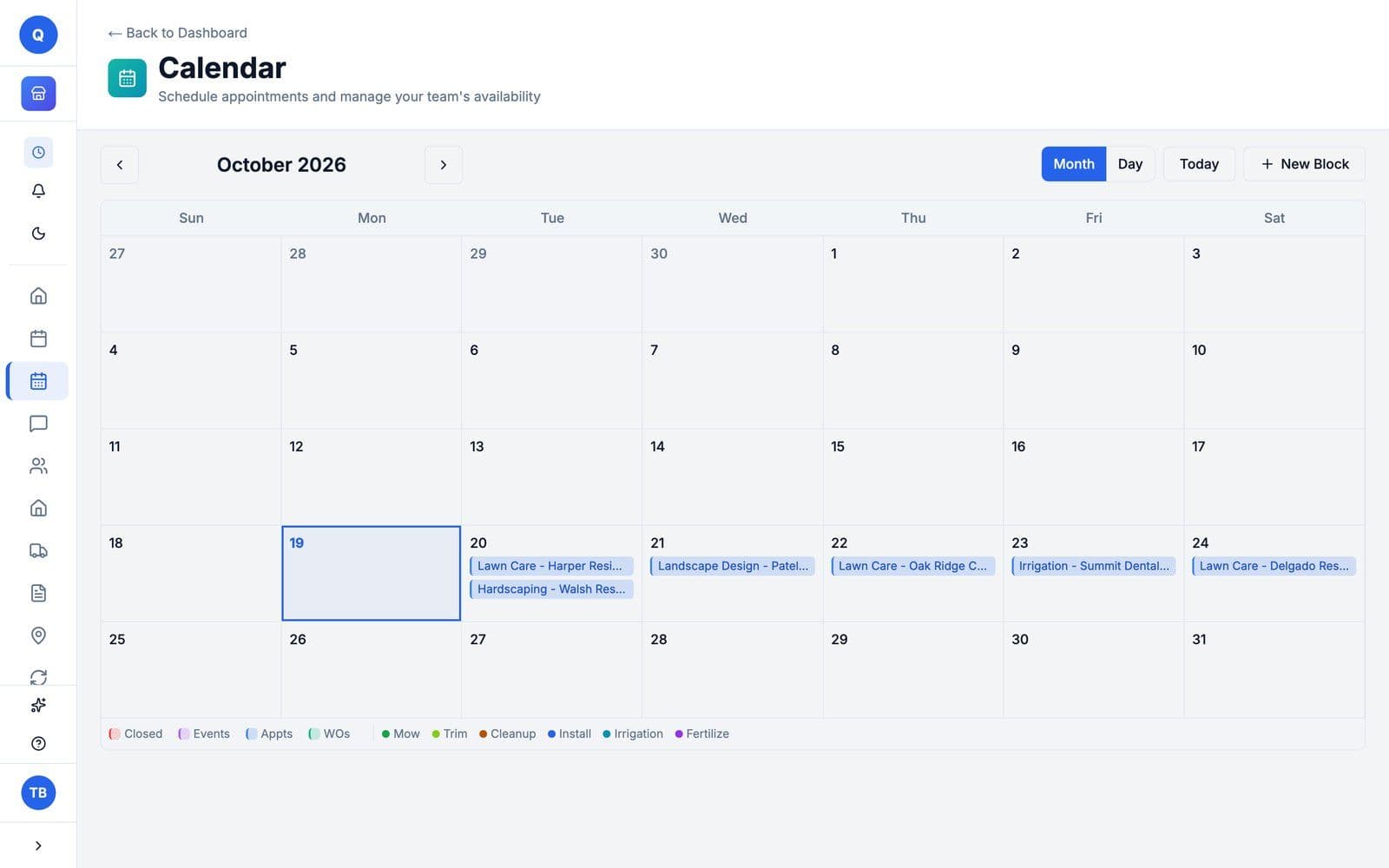
The calendar's month view for October 2026: six visits booked from Tuesday the 20th to Saturday the 24th, lawn care, hardscaping, landscape design, irrigation and lawn care again, each with its property
October at Evergreen Lawn & Landscape, our landscaping demo shop: six visits booked for the week of the 20th.
02 / 05

Do the work.

One work order per job: the customer, the property, the labor, the materials and the photos, and a way to reach the customer from it.

Every plan

Can I keep the job, the property and its photos on one work order?

Yes. A work order holds the customer, the property, the jobs with their labor and materials, and the photos you upload from your device or take with your phone's camera. Free allows 3 photos per work order and Basic 10; Pro and Max set no limit.

  • On any paid plan, assign a crew or a person to the job, and the board shows the crew on each card.
  • The Free plan covers your first 10 work orders in total, with no time limit.
quotera.app/work-orders
The Active Work Orders board for a landscaping business: one card per job with the customer, the property, the service, the North Crew or South Crew chip, the total and what is still due
The work order board at Evergreen Lawn & Landscape, our landscaping demo shop: each job with its property, its service, its crew and what is due.
Every plan

Does Quotera keep each customer's properties and their history?

Yes. Pick one of the customer's properties or add a new one when you create a work order, and its service history builds automatically. Each property keeps its details, like lot size, gate code, pets and irrigation. The Free plan holds up to 50 customers and 50 properties; paid plans set no limit.

  • Moving over? Import your customers and their properties from a CSV file on any paid plan.
quotera.app/customers
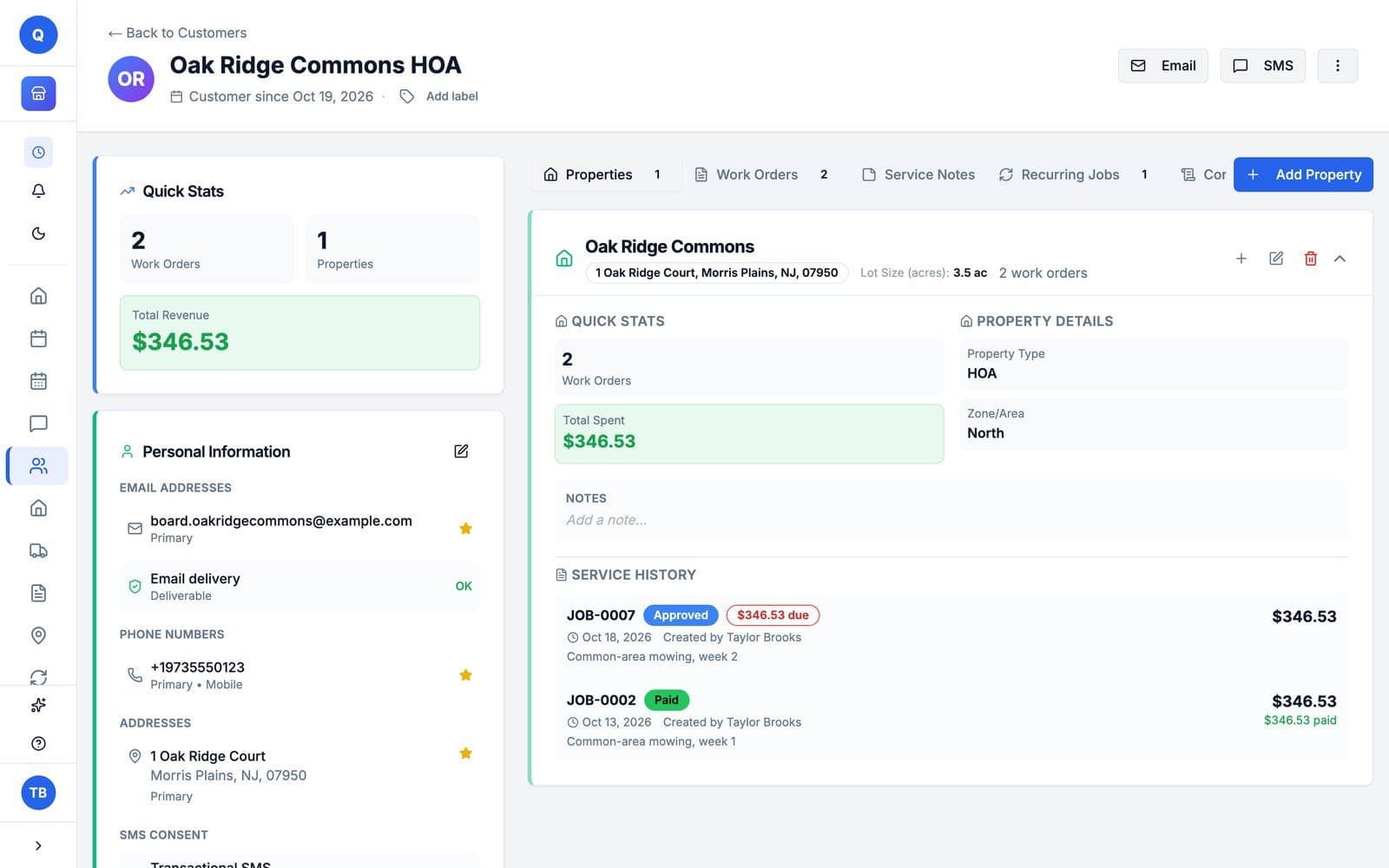
A customer's property: Oak Ridge Commons in Morris Plains, NJ, 3.5 acres, with its property type and zone, what the customer has spent there, and its service history of two weekly mowing jobs
The Oak Ridge Commons property at Evergreen Lawn & Landscape, our landscaping demo shop, with its service history.
Every paid plan

Can I bring my customers and their properties over from my old software?

Yes, your customers and their properties, from a CSV file. In Quotera, go to Settings, then Import, upload the file and map your columns; customers you already have, with the same email or phone, are flagged and skipped. Customers and their properties import on every paid plan for landscaping businesses, and in the free trial. The Free plan cannot import. Past work orders and invoices do not import. Contact support and we will work out the options with you.

Every planemailEvery paid plantexting

Can I text and email customers from Quotera?

Yes. Emailing estimates and invoices works on every plan, including Free, and customer replies show up as threaded conversations. Texting starts on Basic with 50 one-way texts a month; Pro has 200 a month with two-way conversations and freeform replies; Max has no monthly cap and adds photo texts and saved templates. Texting is not part of the free trial or the Free plan.

  • US carriers require every business to register before it texts customers, and registration asks for your business's own website. You start it from Settings, under Connections. No website yet? We build them.

Texting by plan

Basic
50 texts a month, one-way
Pro
200 a month, with two-way conversations and freeform replies
Max
No monthly cap, plus photo texts and saved templates

Email and threaded replies on every plan (Free includes 100 a month). Each estimate or invoice you send carries its own link for the customer.
Every paid plan

Can I keep materials in stock and see what is running low?

Yes, on any paid plan. Basic tracks up to 50 items, Pro 250, and Max sets no limit. Add mulch, seed or sprinkler heads to a job from inventory, the count comes down when the customer approves the estimate, and items below their minimum show a Low Stock badge.
quotera.app/work-orders
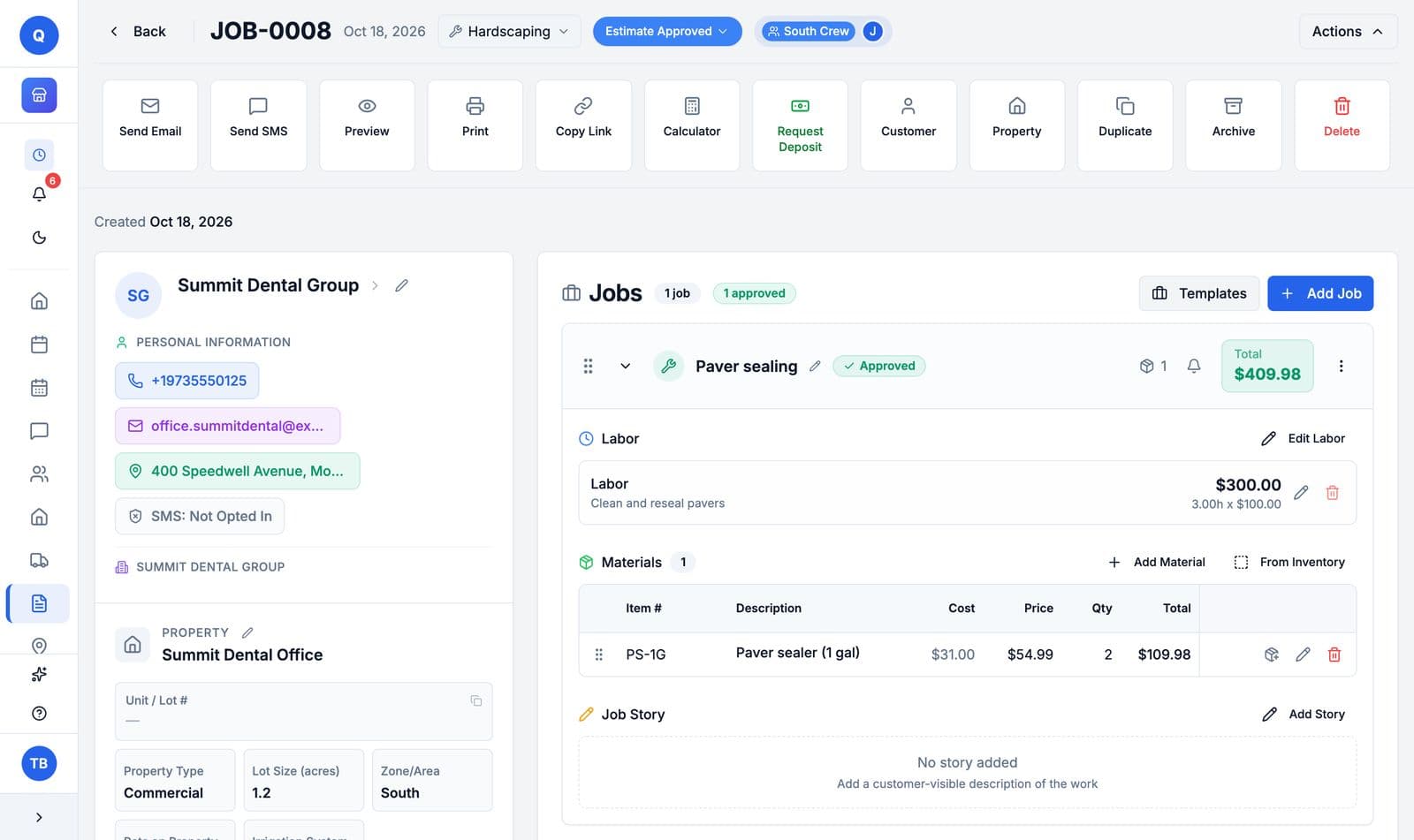
A Paver sealing job at Evergreen Lawn and Landscape: labor at $300.00, and under Materials, 2 gallons of paver sealer at $54.99 each, with Add Material and From Inventory buttons
A paver-sealing job at Evergreen Lawn & Landscape, our landscaping demo shop: the labor, then the sealer added from inventory.
Max

Can Quotera remind customers before their appointment?

Yes, on Max: attach a reminder when you book and it goes out by text or email before the appointment. On Basic and Pro, you can send an appointment reminder text by hand from the work order; it counts toward your monthly texts.

03 / 05

Tools for your trade.

Built for crews on the road: each crew's stops in drive order, and weekly service set up once. No add-ons to buy.

Every paid plan

Can Quotera put my crew's stops in order?

Yes, on any paid plan for landscaping businesses. The Route Planner puts a crew's stops in drive order and hands the route to Google or Apple Maps, and you can save each crew's route for the day, so the stops are ready when the crew heads out.

  • Add stops from your properties or from work orders, or type an address.
quotera.app/route-planner
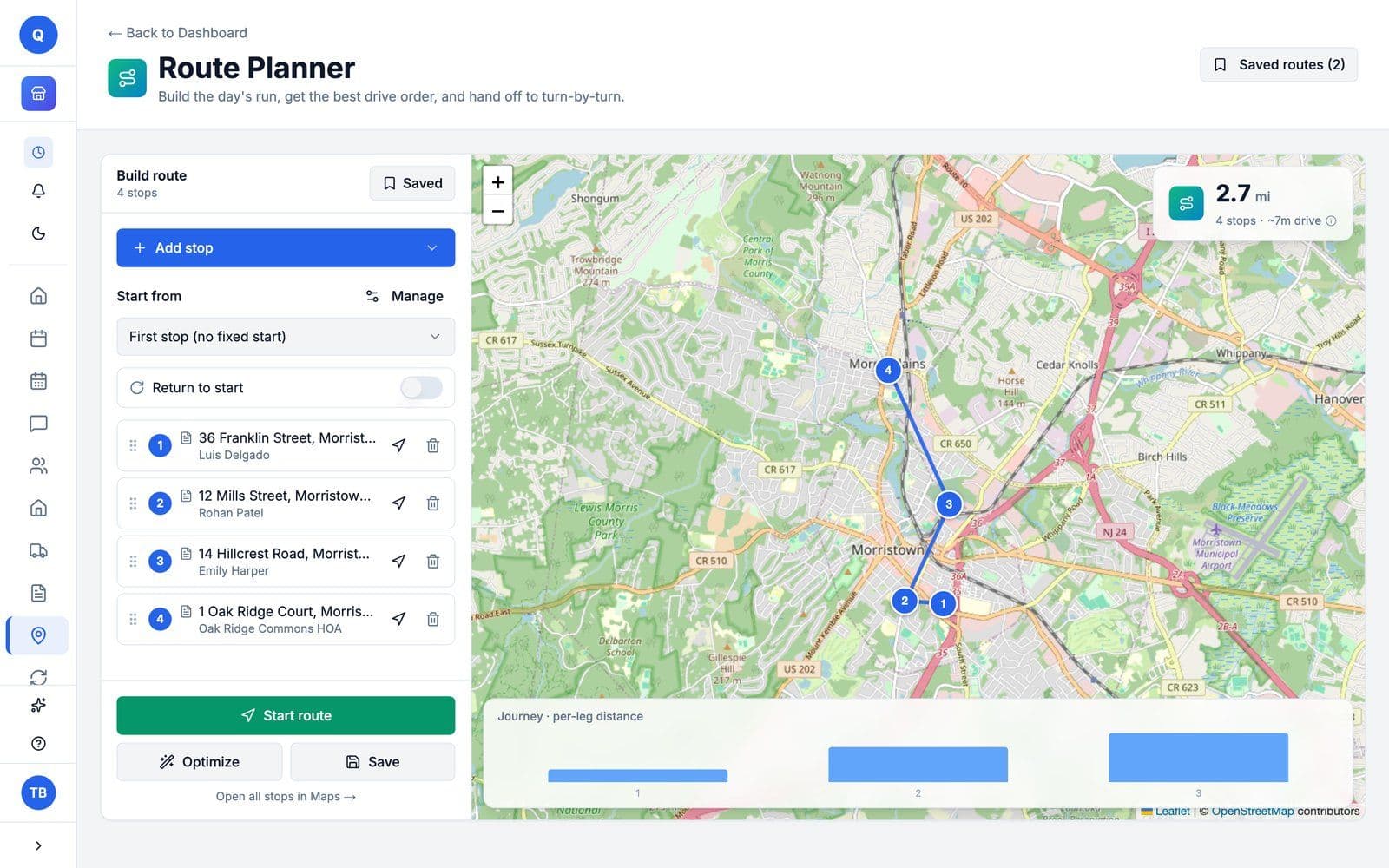
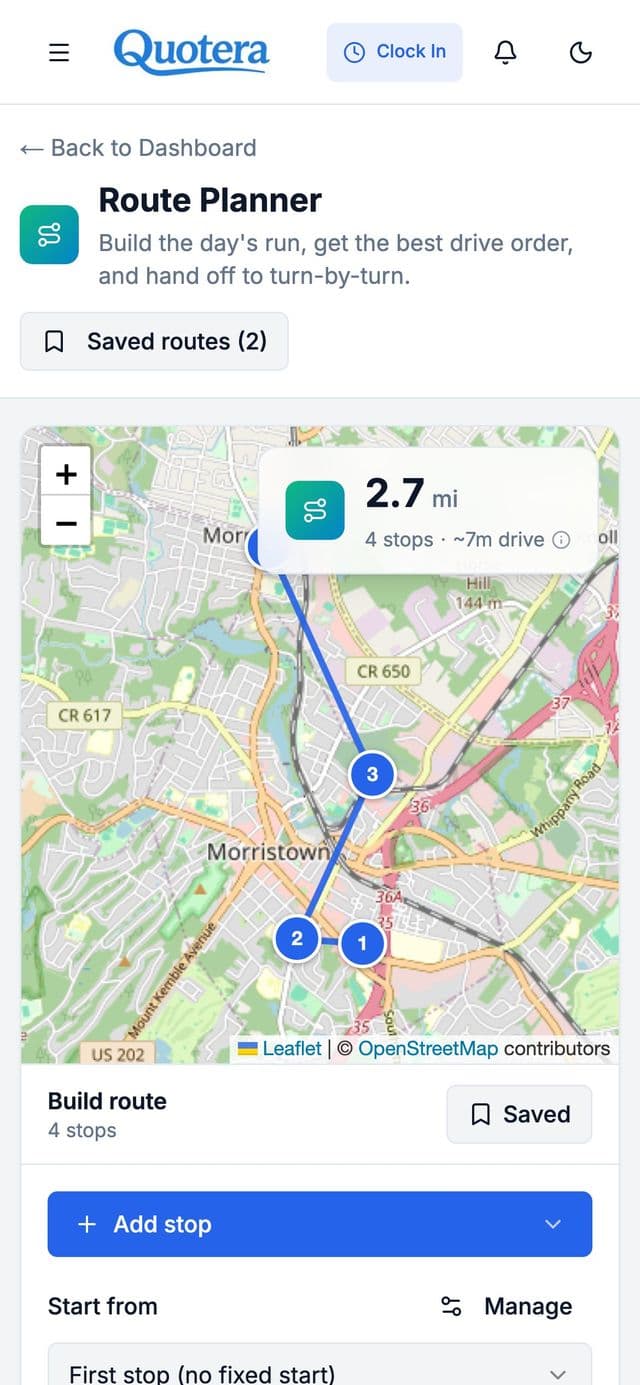
The Route Planner with the North Crew's saved route for the day: four stops in Morristown and Morris Plains, numbered in drive order on the map, 2.7 miles and about 7 minutes of driving, with Start route
The North Crew's route for the day at Evergreen Lawn & Landscape, our landscaping demo shop.
From Pro

Can I set up weekly service once and get a work order for every visit?

Yes, for landscaping businesses on Pro and Max. Set a recurring job once, every week, every few weeks or every month, and Quotera creates each visit's work order. Pro holds 15 active recurring jobs, and Max sets no limit.

  • Each visit's work order comes with the same jobs, materials and price, and the people you assigned.
quotera.app/recurring-jobs
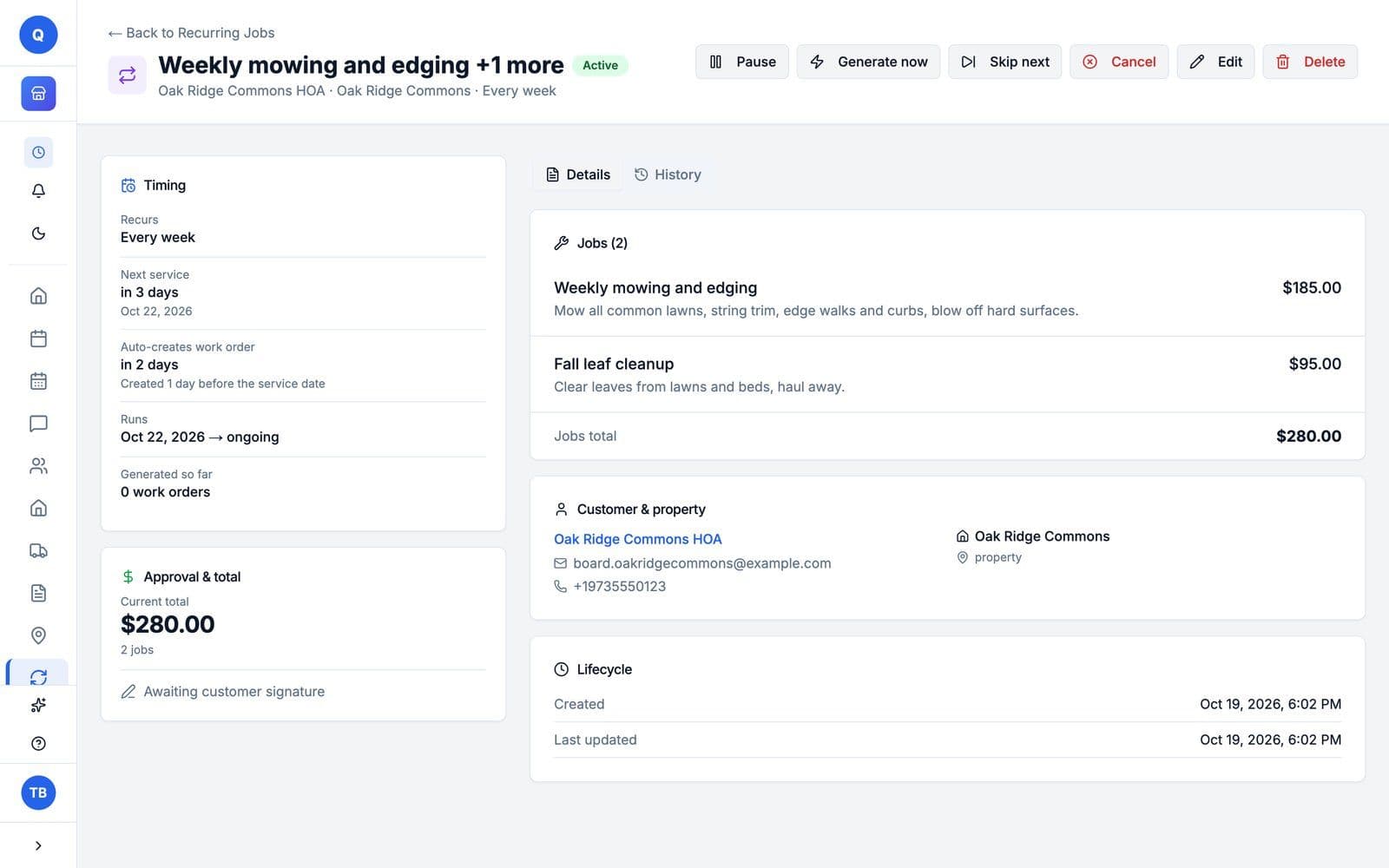
A recurring job for Oak Ridge Commons HOA: weekly mowing and edging plus fall leaf cleanup, $280.00, recurs every week, next service Oct 22, and the work order is created 1 day before the service date
A weekly job at Evergreen Lawn & Landscape: each visit's work order is created the day before.
From Pro

Can customers sign a service contract online?

Yes, for landscaping businesses on Pro and Max. Contracts are service agreements built from your own template, which the customer signs online. Pro holds 25 active contracts, and Max sets no limit.

  • Use them for a season of mowing or a maintenance plan, on the terms you write.
04 / 05

Get paid.

The invoice comes from the work order. The customer pays by card from the link, or you record cash and checks yourself.

Every plan

Can I turn the job into an invoice and record how the customer paid?

Yes, on every plan, including Free. The invoice comes from the same work order, so nothing is typed twice. Email it to the customer from the work order, and record cash, checks and other payments yourself with Add Payment; payments you record have no fee.

quotera.app/document
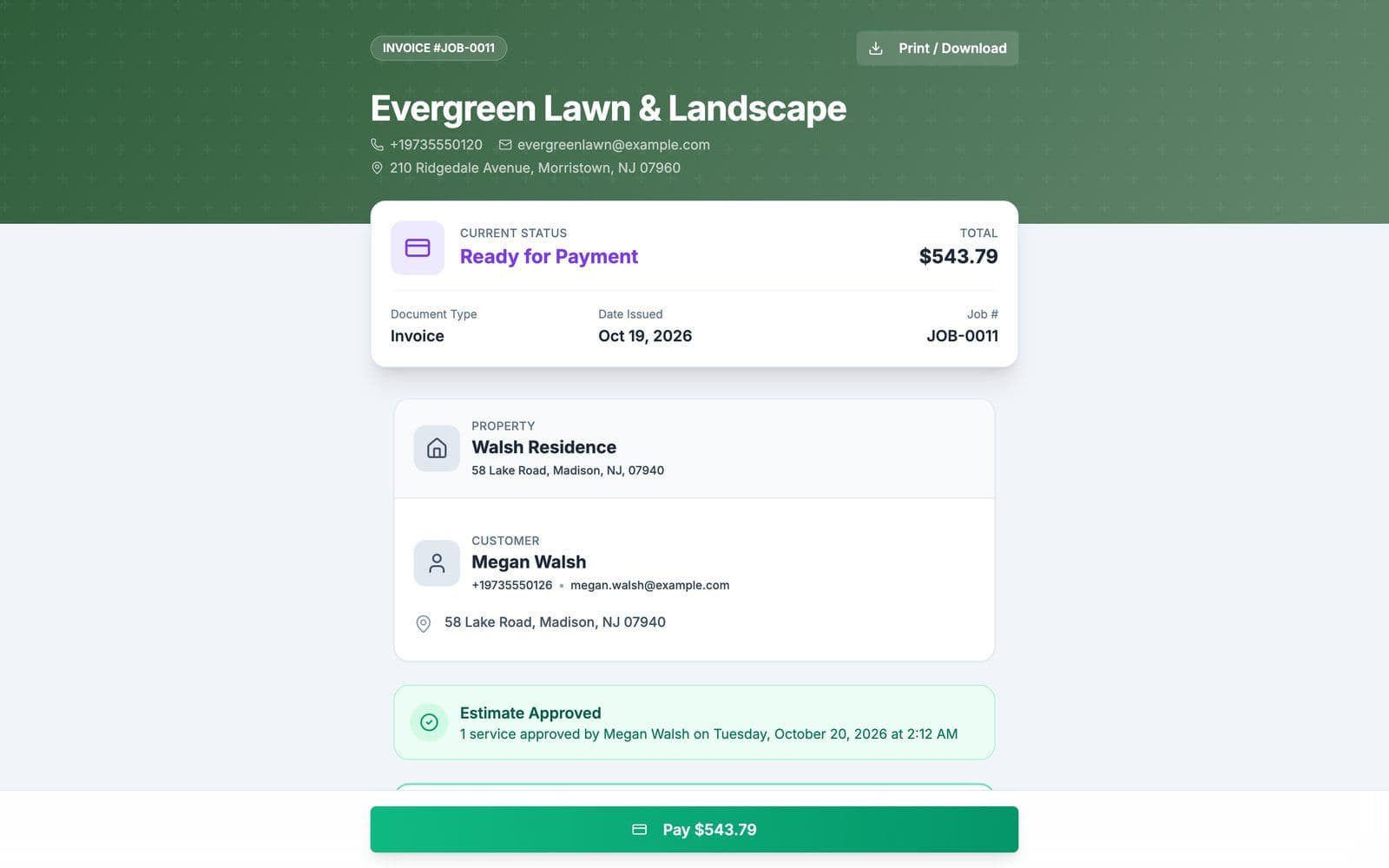
An invoice as the customer sees it, under Evergreen Lawn and Landscape's green header: JOB-0011 for the Walsh Residence, ready for payment, $543.79, with the estimate approved by Megan Walsh and a Pay $543.79 button
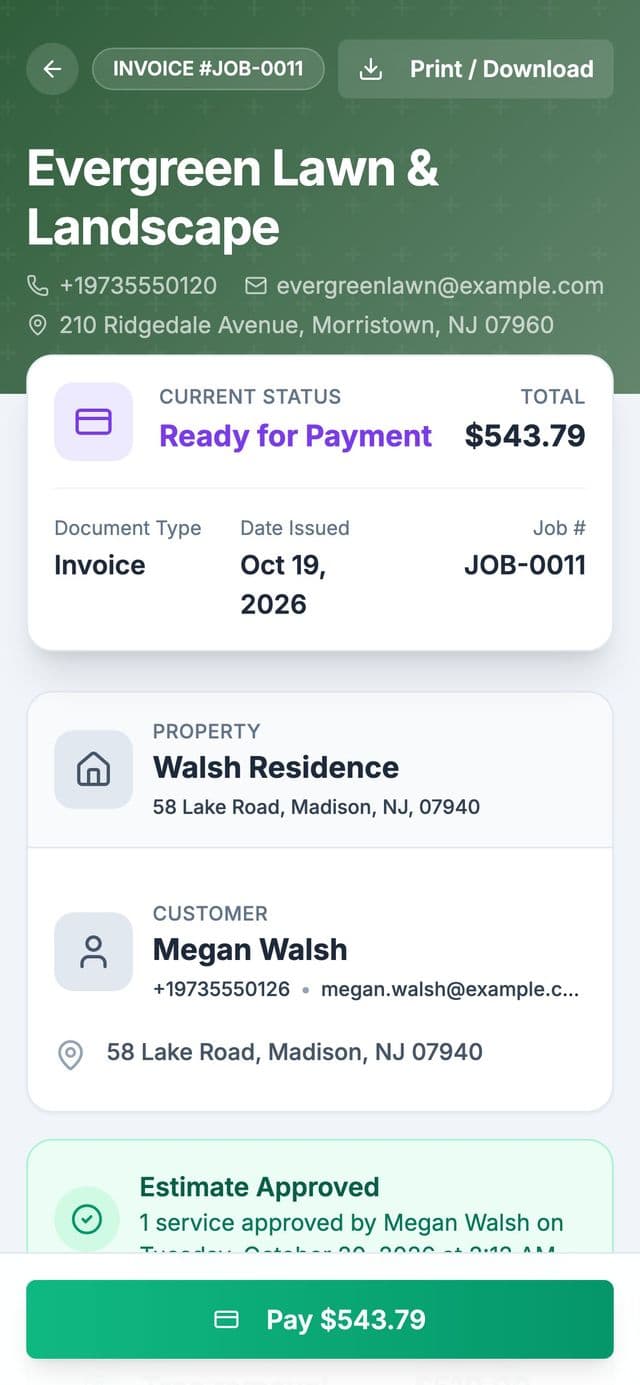
The invoice for the Walsh Residence at Evergreen Lawn & Landscape, made from the approved estimate. Logo and header color: Pro and up.
Every paid plan

Can customers pay an invoice by card from their phone?

Yes, on any paid plan. Connect Stripe, and the invoices you send get a Pay Now button; customers pay by credit or debit card, and the money goes to your Stripe account, then your bank. Each online card payment has Stripe's fee (2.9% + 30¢) and a Quotera platform fee (1% + 20¢), taken out before payout. Cash, checks and payments you record yourself have no fee.

Online card payments
3.9% + 50¢
Cash, checks, recorded payments
$0
  • On a $1,000 card payment you keep $960.50.
The invoice on the customer's phone under Evergreen Lawn and Landscape's green header: JOB-0011 for the Walsh Residence, ready for payment, $543.79, with a green Pay $543.79 button at the bottom

1The customer taps Pay

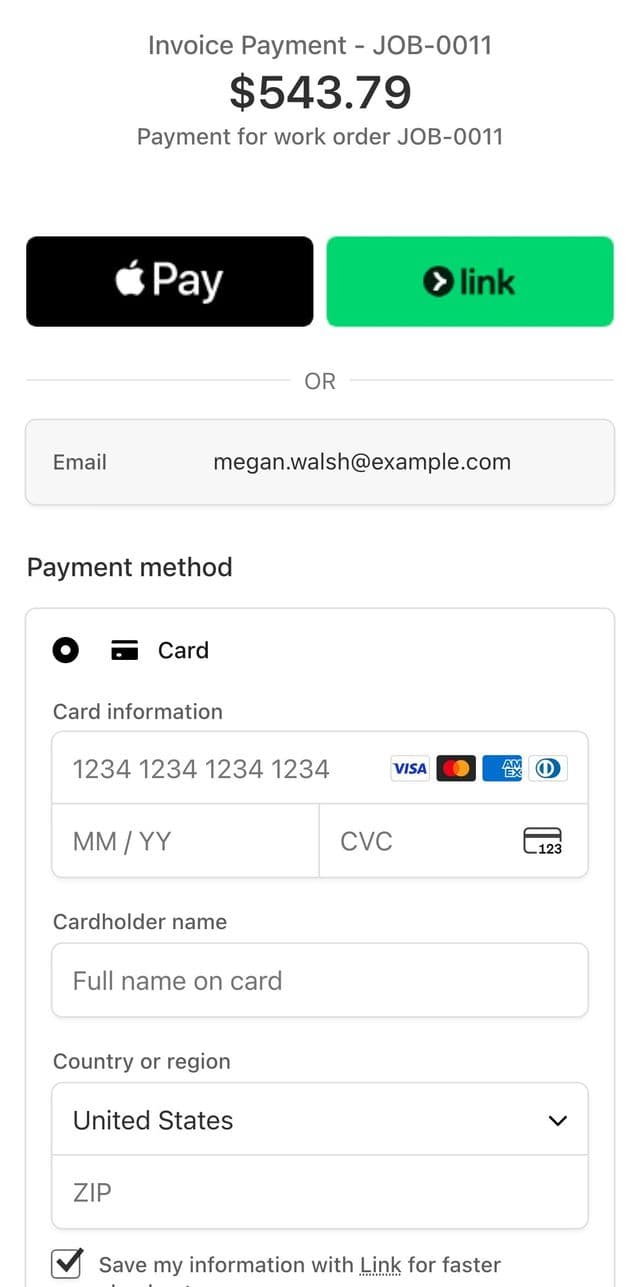
Stripe's checkout page on the phone: Invoice Payment, JOB-0011, $543.79, with Apple Pay, Link and a card form

2They pay by card on Stripe

A demo invoice from Evergreen Lawn & Landscape, our landscaping demo shop, with Stripe in test mode. No card was entered and nothing was charged. Logo and header color: Pro and up.
Every paid plan

Can I see what came in and export it for my accountant?

Yes, on any paid plan. The Reports page shows revenue, profit and loss, expenses, payments and sales tax, and exports five CSV files: profit and loss, expenses, payments, tax summary and invoices.

  • Expenses for rent, tools and supplies feed the profit numbers, on every paid plan.
  • Export your reports to CSV for your bookkeeper or accountant.
quotera.app/reports
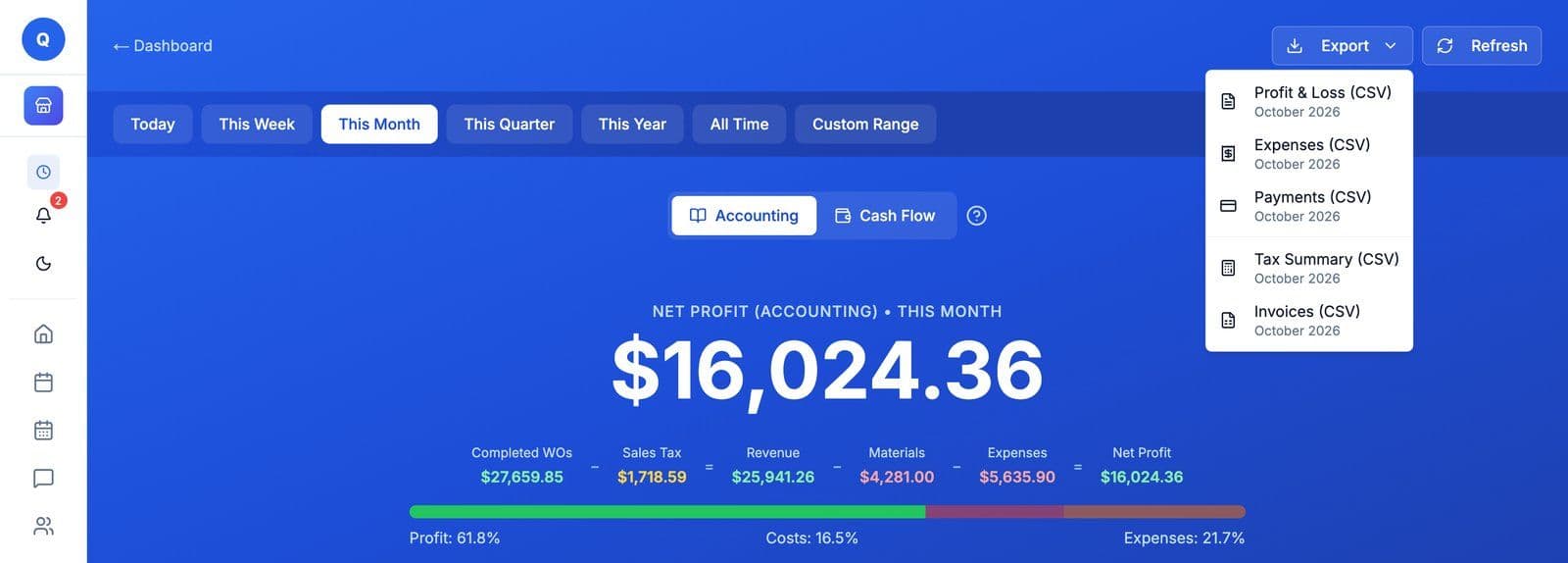
Reports, Accounting, October 2026: net profit $16,024.36 on $25,941.26 in revenue, after $4,281.00 in materials and $5,635.90 in expenses, with the Export menu open on five CSV files: Profit and Loss, Expenses, Payments, Tax Summary and Invoices
October at Evergreen Lawn & Landscape, our landscaping demo shop, with the Export menu open. Demo shop figures.
05 / 05

Run the business.

Put your people into crews with their own logins, and bring customers back without writing every message yourself.

Every paid plan

Can my crew have their own logins, and can I group them into crews?

Yes, on any paid plan. Basic covers up to 5 people, and Pro and Max set no limit. Each person gets a role, from the preset landscaping roles or ones you build, and Crews group your people into named, color-coded crews you can assign to a job like a single person.

  • Landscaping starts with Owner, Manager, Estimator, Crew Lead, Crew Member and Bookkeeper.
quotera.app/team/members
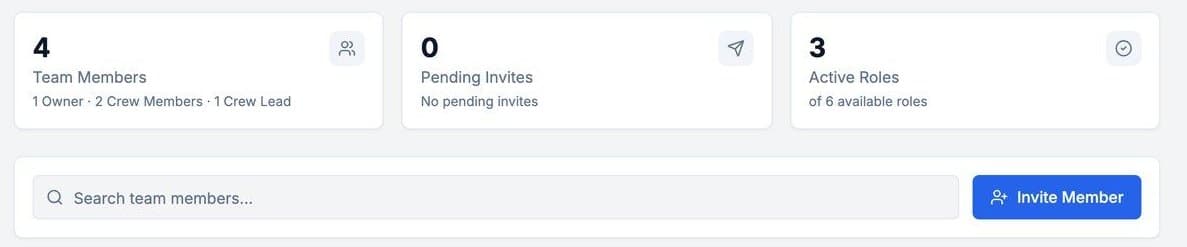
Manage My Team at a landscaping business: 4 team members, 1 owner, 2 crew members and 1 crew lead, no pending invites, 3 of 6 roles in use, and an Invite Member button
The team at Evergreen Lawn & Landscape: an owner, a crew lead and two crew members.
quotera.app/team/crews
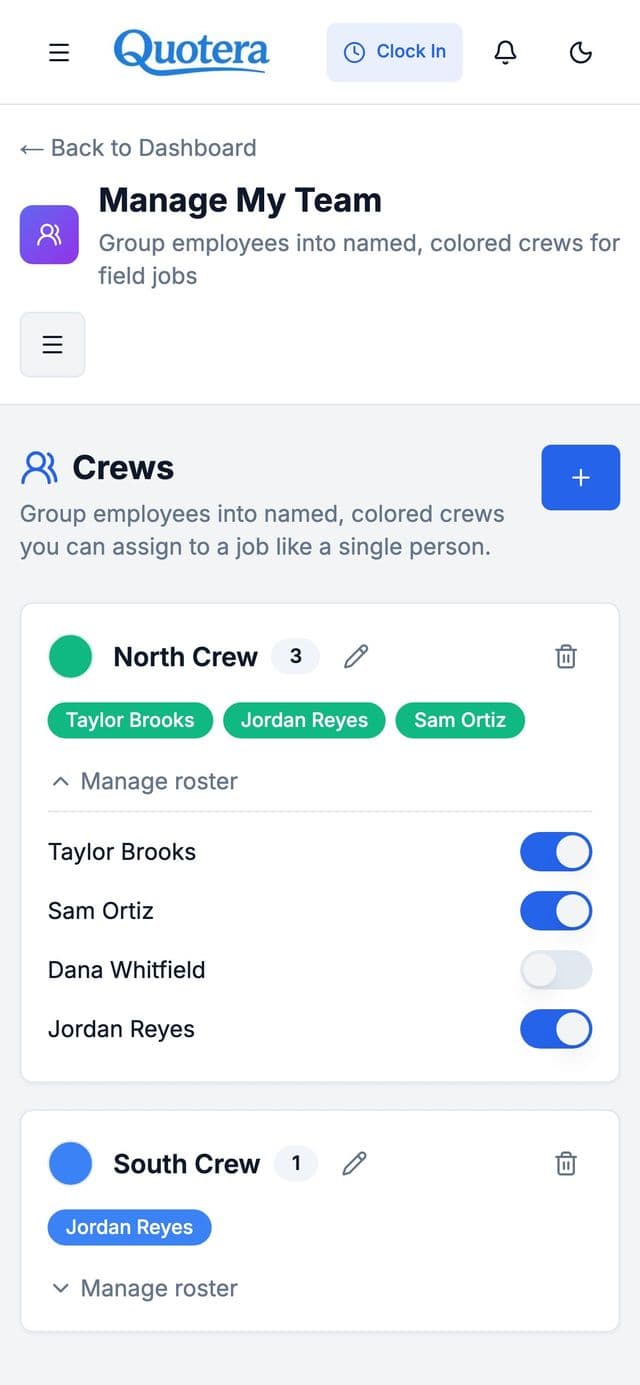
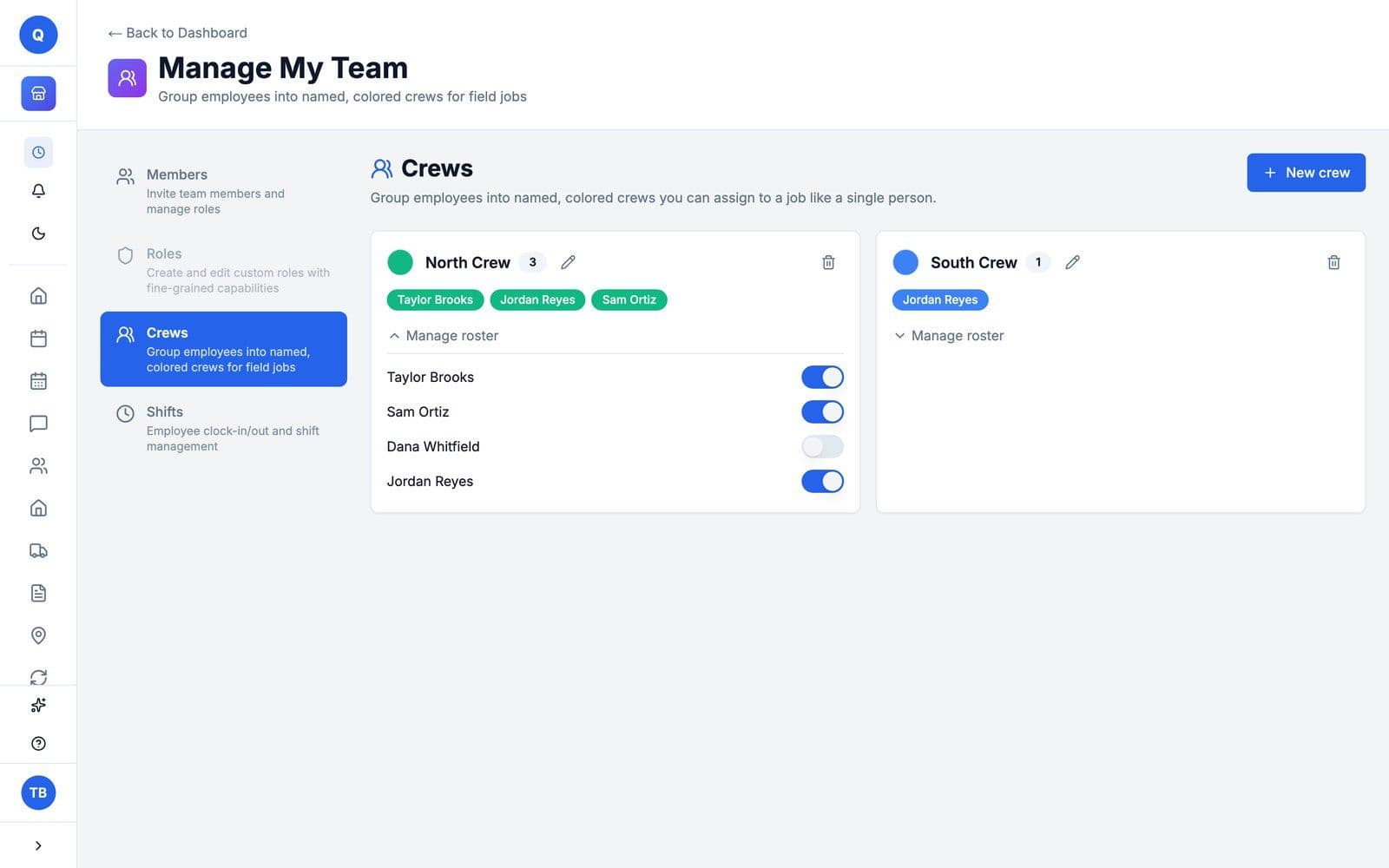
Crews: North Crew with Taylor Brooks, Jordan Reyes and Sam Ortiz in green, its roster open with a switch for each person, and South Crew with Jordan Reyes in blue
Crews on a phone: North Crew with its roster open, and South Crew, each in its own color
The same people in two color-coded crews, with the North Crew's roster open.
Max

Can Quotera bring customers back and ask for reviews?

Yes, on Max. The Marketing Center sends win-back messages to customers who have not been back in a while, service reminders and a thank-you after the job, by email, or by text to customers who agreed to offers. It can also put your Google review link on the estimates and invoices customers sign.

  • Service reminders go out a set number of weeks or months after the job is done, by email, or by text to customers who agreed to offers.
quotera.app/marketing
The Google Reviews setting: Show Review Button on Documents, switched on, which displays a Leave a Review button after customers sign estimates or invoices
The review button setting: once it is on, a customer who signs an estimate or invoice sees a Leave a Review button.

Campaigns you can run

Win-back
Customers who have not booked in a while
Reminders
The next service, weeks or months after the last one
Follow-ups
Estimates waiting for approval, unpaid invoices and declined work
Thank-you
After the job, with your review link
Before you sign up

Three more things owners ask.

Every paid plan

Do my customers need to download an app to approve or pay?

No. On any paid plan, your customer opens the estimate from a link in their phone's browser and signs to approve it, then pays the invoice by card the same way if you take online payments. Nothing to download. You send the link from the work order, by email, or by text to customers who opted in to texts. Texting starts when you subscribe.

Every plan

Does Quotera work on a Mac or a Windows PC?

Yes. Quotera runs in your web browser on a Mac or Windows computer, with nothing to install.

Every plan

Does Quotera work on my phone?

Yes. Quotera runs in your phone's web browser, with nothing to install.

At a glance: Quotera One

Twelve questions one-person businesses ask, answered one at a time.

Each one links to its answer. All twelve come with Quotera One; the five marked Free plan too also work on the Free plan.

  1. EstimatesFree plan too
  2. E-signatures
  3. Work orders and photosFree plan too
  4. Customers and their jobsFree plan too
  5. Importing your customers
  6. Email to customersFree plan too
  7. Labor presets
  8. InvoicesFree plan too
  9. Card payments
  10. Reports and CSV export
  11. Expenses
  12. Business miles

In Quotera OnePart of the plan, for one person in any tradeFree plan tooAlso on the Free plan, within its limits

01 / 04

Win the job.

Quotes and estimates customers approve from their phone: the estimate goes out as a link, and the customer signs it.

In Quotera OneFree plan too

Can I write estimates and quotes in Quotera?

Yes, on every plan, including Free. The estimate is the work order itself: add the jobs with their labor and materials, then email it to the customer from the work order, and they open it from a link. Signing it online starts on a paid plan.

quotera.app/document
The estimate the customer opens from the email: Reed Home Services, awaiting approval, $742.99, for Lakeside Realty Group, with the punch list job and a Sign to Approve bar
An estimate from Reed Home Services, our Quotera One demo shop, as the customer opens it in their browser.
In Quotera One

Can customers approve an estimate from their phone?

Yes, on any paid plan. Customers open the estimate link and sign to approve, you get notified, and the work order status updates. Paying by card comes with the invoice: once you invoice the job, the link gets a Pay Now button if you take online payments.

  • E-signatures are part of Quotera One, so a one-person business gets the same signed approval as a bigger shop.
  • On the Free plan you can write estimates; signing them online starts on Quotera One.
The estimate on the customer's phone: Reed Home Services, awaiting approval, $742.99, a punch list job for Lakeside Realty Group, and Sign to Approve at the bottom

1The customer opens the link

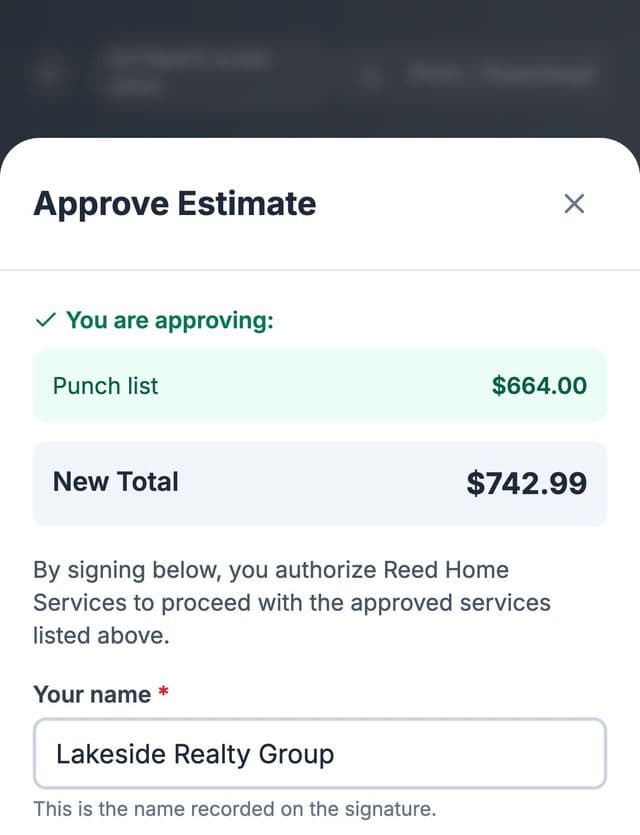
The Approve Estimate sheet on the phone: the punch list at $664.00, a new total of $742.99, the authorization line and the customer's name for the signature

2They sign to approve

Reed Home Services, our Quotera One demo shop: a punch list estimate for a realty group.
02 / 04

Do the work.

One work order per job: the customer, the labor, the materials and the photos, and an email to the customer from it.

In Quotera OneFree plan too

Can I keep each job and its photos on one work order?

Yes. A work order holds the customer, the jobs with their labor and materials, and the photos you upload from your device or take with your phone's camera. Quotera One has no limit on work orders and allows 5 photos on each; the Free plan covers 10 work orders in total, with 3 photos each.

quotera.app/document
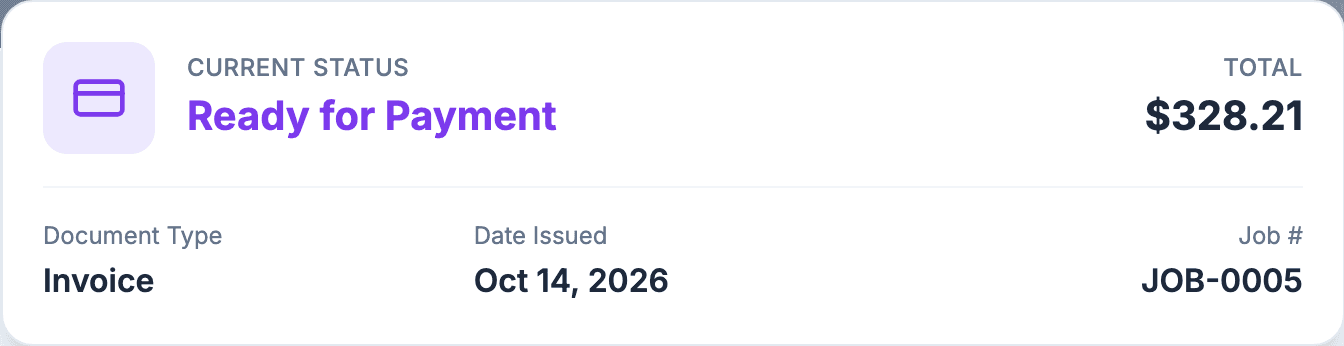
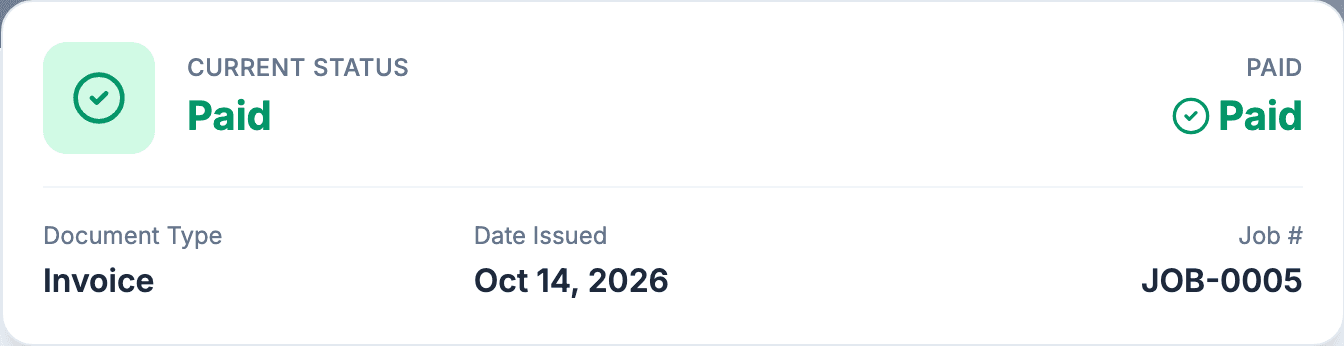
One job at Reed Home Services, our Quotera One demo shop, as the customer sees it at each step.
In Quotera OneFree plan too

Does Quotera keep my customers and the jobs I have done for them?

Yes. Each customer keeps their phone, email and address, and the work orders you have done for them. Quotera One sets no limit on customers, and the Free plan holds up to 50.

quotera.app/customers
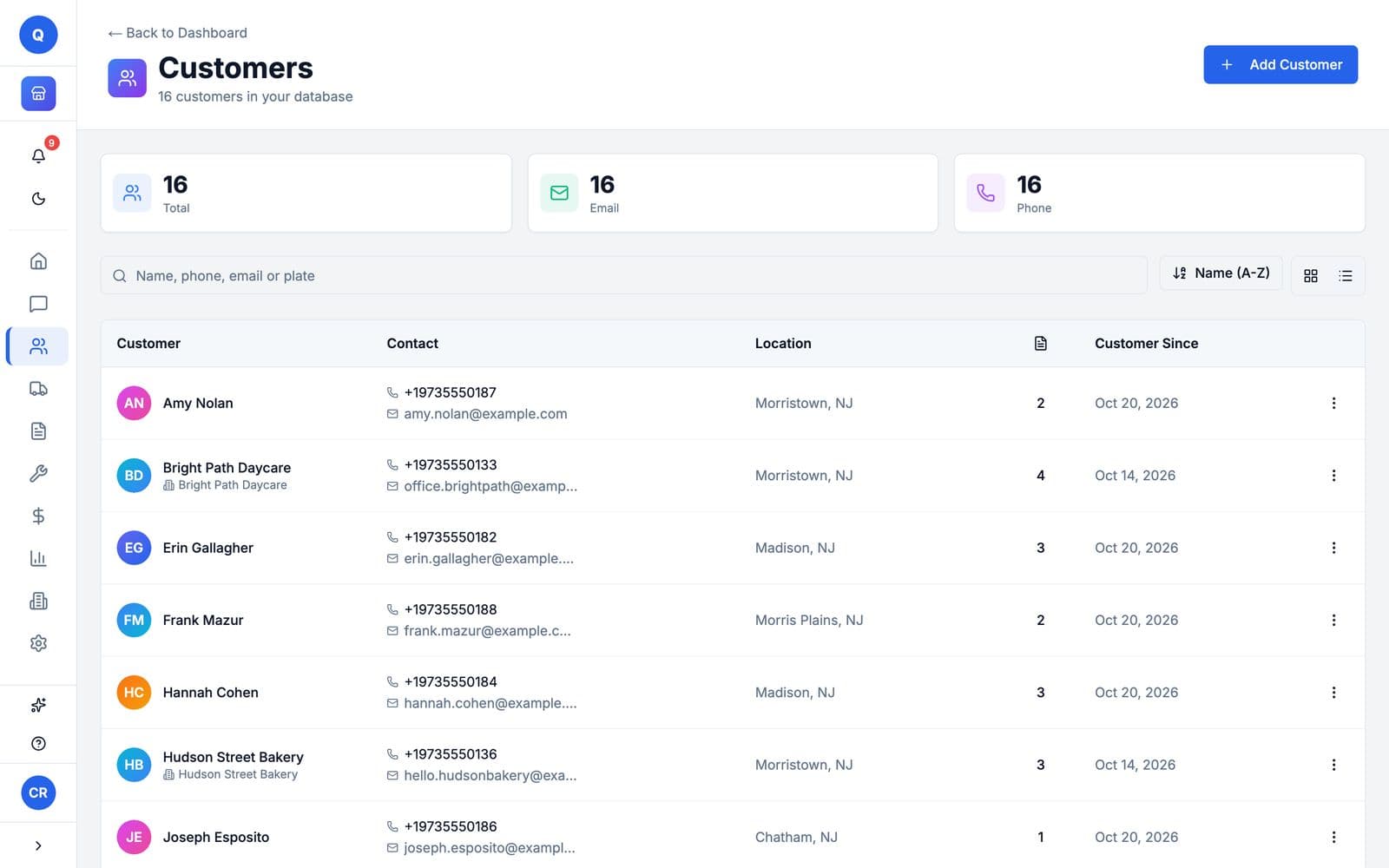
The customer list at Reed Home Services: six customers, each with a phone number, an email address and a town in New Jersey
The customer list at Reed Home Services, our Quotera One demo shop: each customer with their phone, email and town.
In Quotera One

Can I bring my customers over from my old software?

Yes, your customers, from a CSV file. In Quotera, go to Settings, then Import, upload the file and map your columns; customers you already have, with the same email or phone, are flagged and skipped. Customer import comes with Quotera One and the free trial. The Free plan cannot import. Past work orders and invoices do not import. Contact support and we will work out the options with you.

In Quotera OneFree plan too

Can I email estimates and invoices to customers from Quotera?

Yes, on Quotera One and the Free plan. Send an estimate or invoice by email from the work order, and the customer gets a link to view it. On Quotera One they can also approve it, and pay online if you accept card payments. Their replies show up as threaded conversations.

  • You can also copy the link and send it any way you like.
In Quotera One

Can I save the work I do often and reuse it?

Yes, on Quotera One. Save your common work as labor presets, and it goes on a job in one click.

03 / 04

Get paid.

The invoice comes from the work order. The customer pays by card from the link, or you record cash and checks yourself.

In Quotera OneFree plan too

Can I turn the job into an invoice and record how the customer paid?

Yes, on every plan, including Free. The invoice comes from the same work order, so nothing is typed twice. Email it to the customer from the work order, and record cash, checks and other payments yourself with Add Payment; payments you record have no fee.

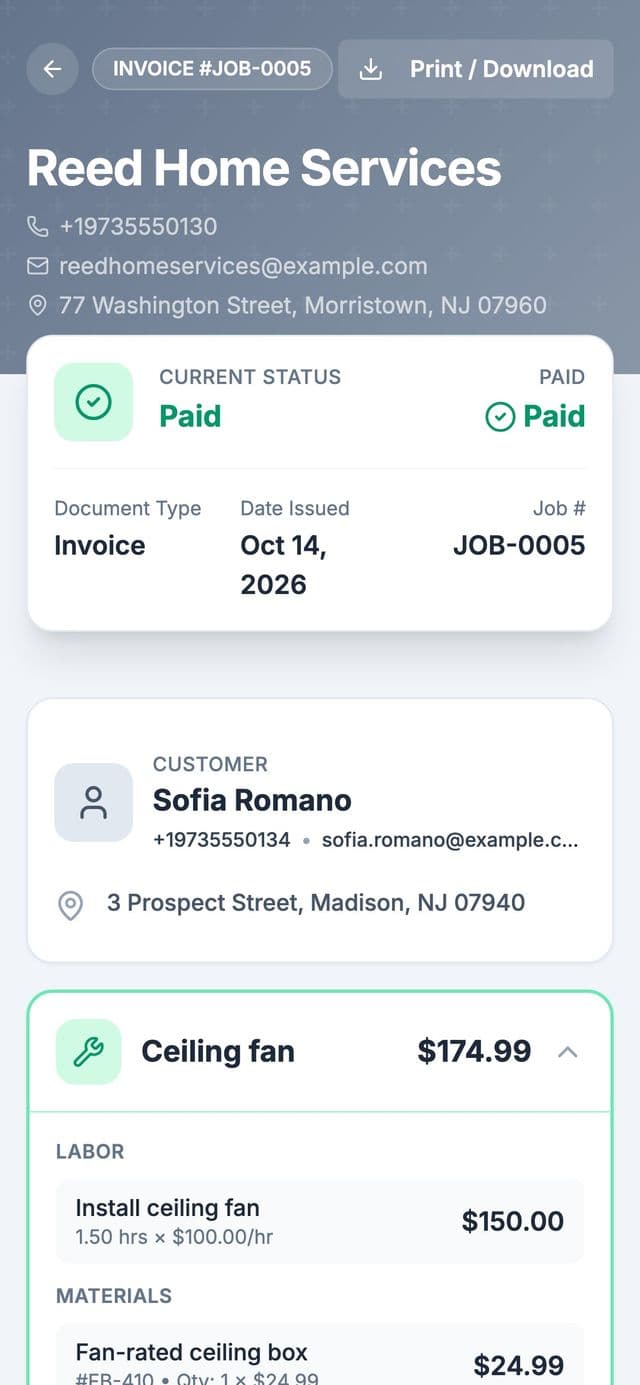
A paid invoice on the customer's phone: Reed Home Services, JOB-0005 for Sofia Romano, status Paid, with the ceiling fan job, its labor and materials
A paid invoice from Reed Home Services, our Quotera One demo shop, on the customer's phone.
In Quotera One

Can customers pay an invoice by card from their phone?

Yes, on any paid plan. Connect Stripe, and the invoices you send get a Pay Now button; customers pay by credit or debit card, and the money goes to your Stripe account, then your bank. Each online card payment has Stripe's fee (2.9% + 30¢) and a Quotera platform fee (1% + 20¢), taken out before payout. Cash, checks and payments you record yourself have no fee.

Online card payments
3.9% + 50¢
Cash, checks, recorded payments
$0
  • On a $1,000 card payment you keep $960.50.
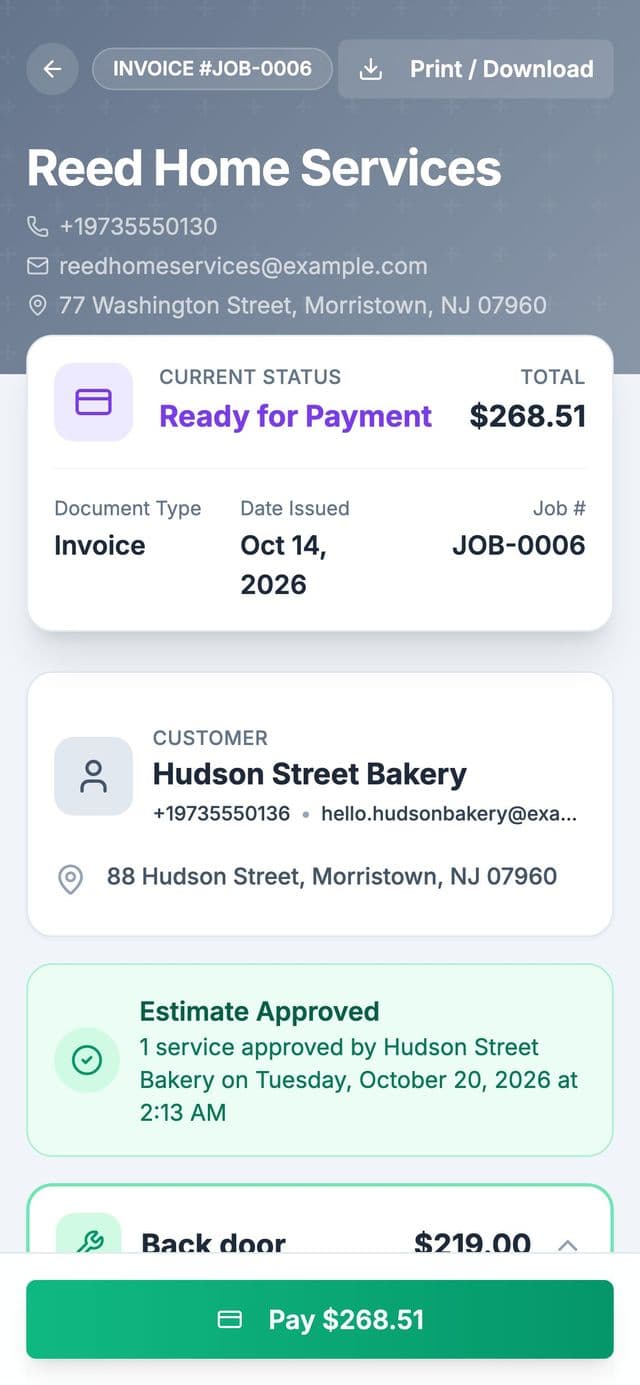
The invoice on the customer's phone: Reed Home Services, JOB-0006 for Hudson Street Bakery, ready for payment, $268.51, with a green Pay $268.51 button at the bottom

1The customer taps Pay

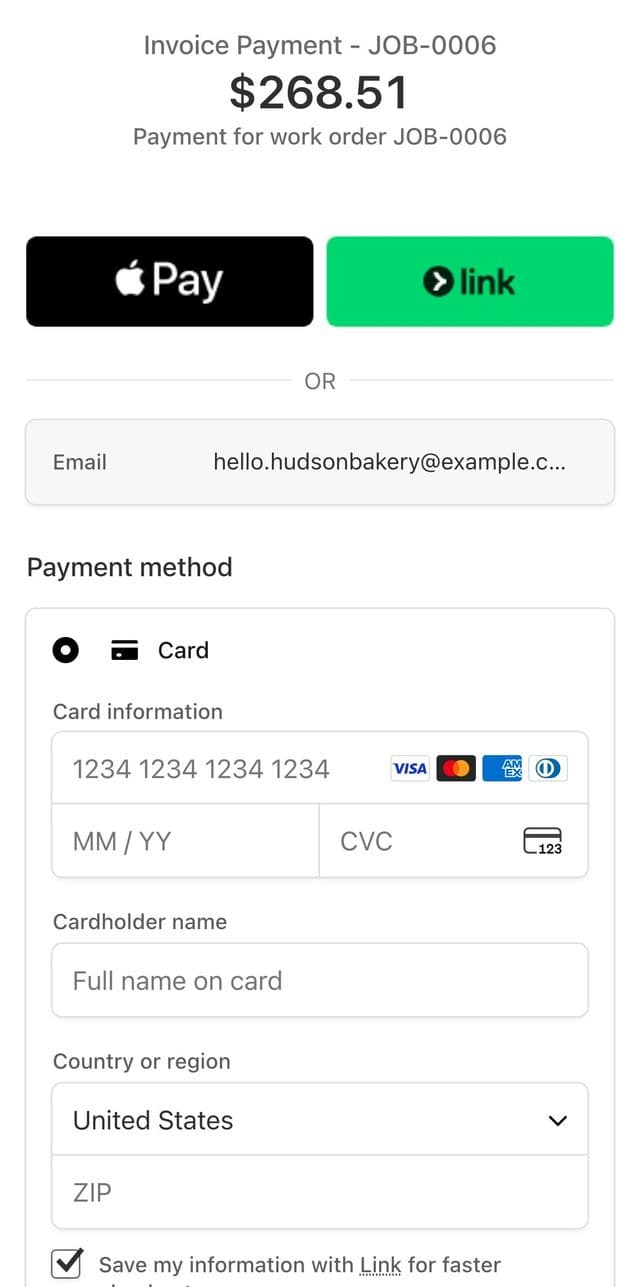
Stripe's checkout page on the phone: Invoice Payment, JOB-0006, $268.51, with Apple Pay, Link and a card form

2They pay by card on Stripe

Reed Home Services, our Quotera One demo shop, with Stripe in test mode: a demo invoice and Stripe's checkout page. No card was entered and nothing was charged.
In Quotera One

Can I see what came in and export it for my accountant?

Yes, on any paid plan. The Reports page shows revenue, profit and loss, expenses, payments and sales tax, and exports five CSV files: profit and loss, expenses, payments, tax summary and invoices.

  • Export your reports to CSV for your bookkeeper or accountant.
quotera.app/reports
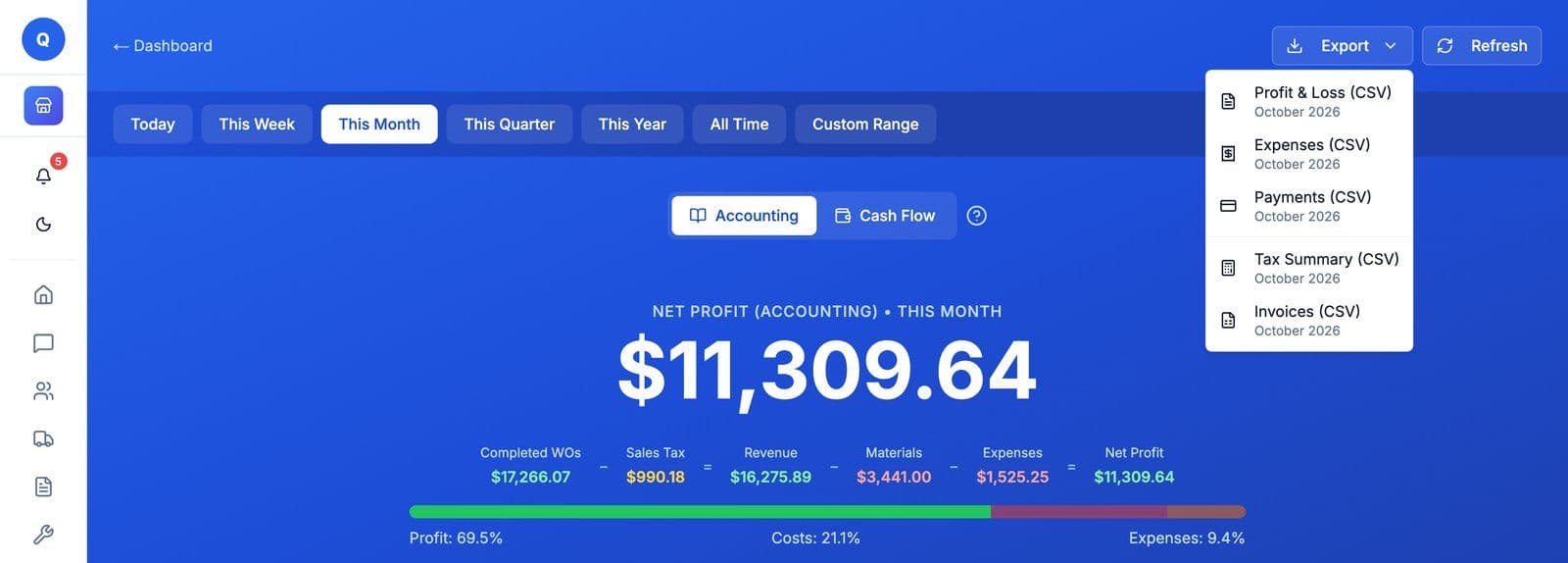
Reports, Accounting, October 2026: net profit $11,309.64 on $16,275.89 in revenue, after $3,441.00 in materials and $1,525.25 in expenses, with the Export menu open on five CSV files: Profit and Loss, Expenses, Payments, Tax Summary and Invoices
October at Reed Home Services, our Quotera One demo shop, with the Export menu open. Demo shop figures.
04 / 04

Run the business.

Keep your costs and your business miles next to the money coming in, ready for tax time.

In Quotera One

Can I track my business expenses?

Yes, on Quotera One. Log expenses for rent, tools, supplies and other costs, and they feed your profit reports.

In Quotera One

Can I log business miles for the tax deduction?

Yes, on Quotera One. Log business miles for one company car or truck, and the tax summary works out the standard mileage deduction for the year.

Kept for you in Quotera One

Business miles
For one company car or truck
Tax summary
Business miles, the standard mileage deduction, and business parking and tolls, for the tax year

Hiring, or want tools built for auto repair or landscaping? The trade plans start at Basic. See how the plans compare.

Before you sign up

Three more things people ask.

In Quotera One

Do my customers need an app to approve an estimate or pay an invoice?

No. On Quotera One, your customer opens the estimate from a link in their phone's browser and signs to approve it, then pays the invoice by card the same way if you take online payments. Nothing to download. You send the link by email from the work order.

Free plan too

Does Quotera work on a Mac or a Windows PC?

Yes. Quotera runs in your web browser on a Mac or Windows computer, with nothing to install.

Free plan too

Does Quotera work on my phone?

Yes. Quotera runs in your phone's web browser, with nothing to install.

Comparing? See how Quotera lines up, with every price sourced and dated:

Try it on your own jobs.

Run any paid plan free for 14 days. No credit card, nothing charged when it ends. Texting starts when you subscribe.

Run Quotera One free for 14 days. No credit card, nothing charged when it ends.

Or call (973) 352-0952. One of the two of us answers.