
SMS Consent & Compliance
How Quotera ensures proper consent collection and TCPA compliance for SMS communications
Overview
How Quotera uses SMS
Quotera is a business management platform for service-based businesses. Shop owners use our platform to send two categories of SMS messages to their customers:
Service Messages include appointment confirmations and reminders, work order status updates, estimate and invoice links, payment reminders, and two-way customer conversations. These are sent with standard SMS consent.
Marketing Messages include promotional offers, maintenance service reminders, follow-ups on unsigned estimates or unpaid invoices, declined service reminders, post-service follow-ups, and customer re-engagement campaigns. These require separate marketing consent.
Service Messages
- • Appointment confirmations
- • Appointment reminders
- • Service status updates
- • Estimate and invoice links
- • Payment reminders
- • Two-way customer replies
Marketing Messages
- • Promotional offers and seasonal deals
- • Maintenance service reminders
- • Unsigned estimate follow-ups
- • Unpaid invoice follow-ups
- • Declined service reminders
- • Post-service follow-ups
- • Customer re-engagement
Two-tier consent: Service messages require standard SMS consent. Marketing messages require separate marketing consent, collected through an additional opt-in. Customers can opt out of either category independently by replying STOP.
How consent is captured
Consent Collection Methods
Method 1: Online Booking Form
Customers can book appointments online through each business's public booking page. The page displays an unchecked SMS consent checkbox that the customer may optionally select. The checkbox is not required to complete the booking.
I agree to receive SMS messages including appointment reminders, service updates, and promotional offers. Message frequency may vary. Msg & data rates may apply. Reply STOP to unsubscribe, HELP for help. Consent is not a condition of purchase. Privacy Policy
↑ This unchecked checkbox appears on the booking form contact step
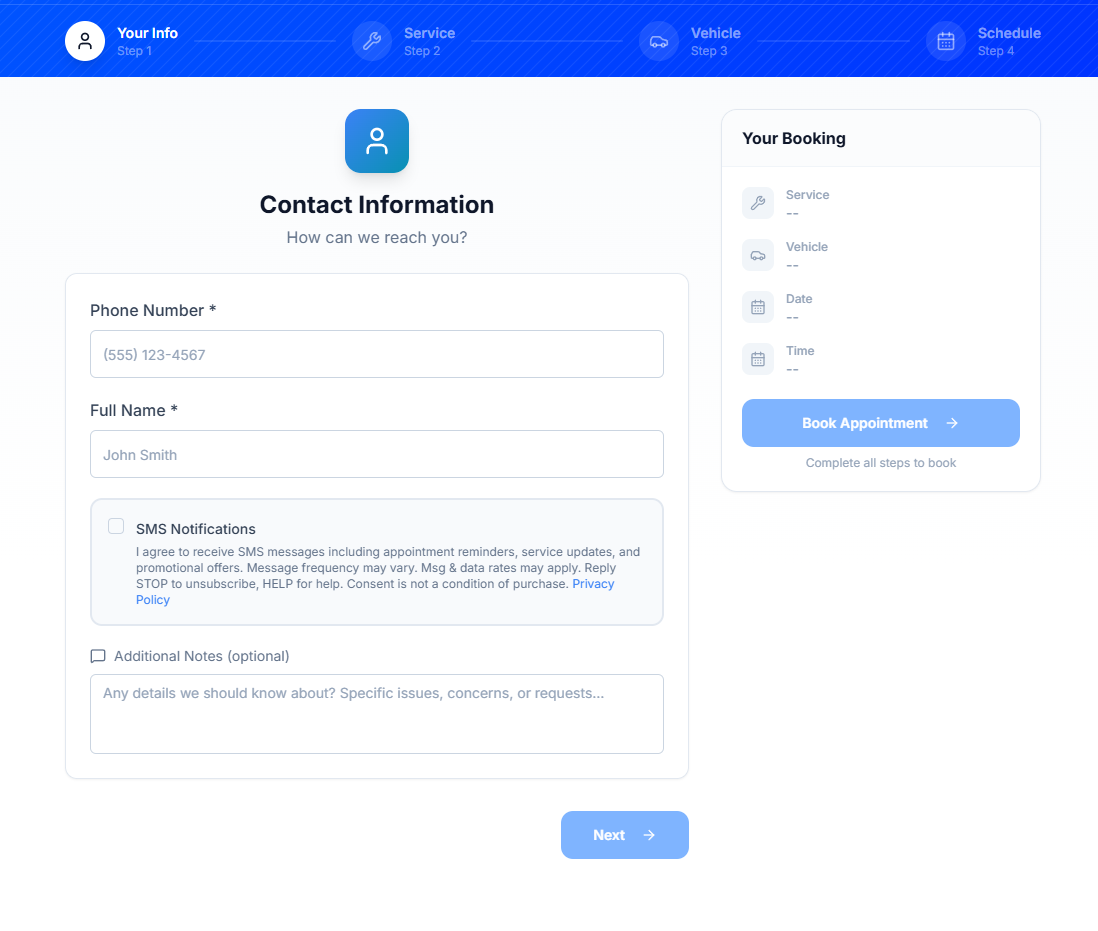
↑ Actual booking form as seen by customers — checkbox is unchecked by default
Consent Action: Customer actively checks the box to opt in. The checkbox is unchecked by default and is not required to complete the booking.
Method 2: Work Order Signature
When customers review and sign an estimate or invoice on the digital document page, the signing modal includes a required mobile number field (prefilled from the customer record and editable so they can correct it) alongside the signature authorization and SMS consent language. The customer confirms their mobile number, draws their signature, and taps Approve.
Mobile number for SMS updates *
↑ Required mobile number field and consent language shown on the signing modal
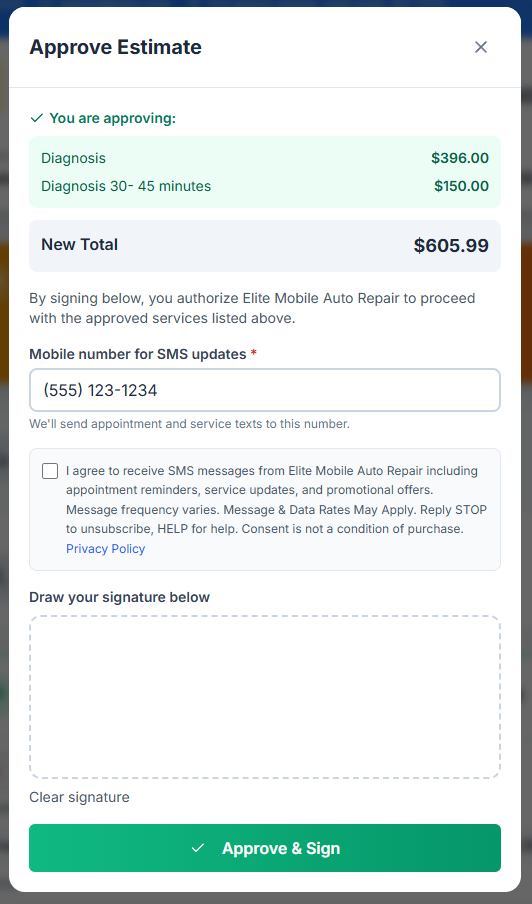
↑ Actual signature modal as seen by customers when approving a work order
Consent Action: Customer signs the document, which includes SMS consent. The signed document with timestamp is stored as written consent.
Examples
Sample Messages
Service Messages
APPOINTMENT CONFIRMATION
Hi John, your appointment at [Business Name] is confirmed for Dec 15 at 2:00 PM. Reply with questions or text STOP to opt out.
SERVICE COMPLETE
Good news! Your service is complete. Total: $425.00. View invoice: https://quotera.app/view/abc123 Reply STOP to opt out.
APPOINTMENT REMINDER
Reminder: Your appointment is tomorrow at 10:00 AM for your scheduled service. See you then! Reply STOP to opt out.
ESTIMATE READY
Your estimate is ready! View details: https://quotera.app/view/xyz789 Call us at 555-0100 with questions. Reply STOP to opt out.
Marketing Messages
PROMOTIONAL OFFER
[Business Name]: Spring is here! Get 15% off your next service visit. Book now at (555) 123-4567. Reply STOP to opt out. Msg&Data rates may apply.
SERVICE REMINDER
Hi John! It's time for your next scheduled service. Regular maintenance keeps everything running smoothly. Schedule with [Business Name] at (555) 123-4567. Reply STOP to opt out.
DECLINED SERVICE FOLLOW-UP
Hi John, checking in about the service we recommended. We want to make sure everything is taken care of. Call [Business Name] at (555) 123-4567 to schedule. Reply STOP to opt out.
CUSTOMER RE-ENGAGEMENT
Hi John, it's been a while since your last visit to [Business Name]. Everything running smoothly? We're here if you need us! Call (555) 123-4567. Reply STOP to opt out.
Keyword handling
Opt-Out & Help Keywords
Opt-Out Keywords
Customers can text any of these to stop receiving messages:
Response:
"You have been unsubscribed from [Business Name]. No more messages will be sent. Reply HELP for help."
Help Keywords
Customers can text these for assistance:
Response:
"[Business Name] uses SMS for appointment reminders and service updates. Msg & data rates may apply. Reply STOP to cancel. Contact: [Business Phone]."
Automatically managed: Opt-out and help keywords are automatically managed by our messaging platform's built-in compliance features. All opt-out requests are honored immediately.
Legal Documentation
The fine print, in full.
Complete privacy policy, terms of service, and SMS communications terms are available at:
See what customers see when they click the link in their SMS notification:
Questions about SMS compliance? Contact us at [email protected]